QR codes are everywhere in 2026 — on restaurant tables, parking meters, packaging, and posters — and most of us scan them without a second thought. That reflexive trust is exactly what a growing wave of QR code scams is built to exploit. Federal agencies have spent this summer warning about the trend, and it has earned its own name: quishing.
Quishing, a blend of “QR” and “phishing,” means hiding a malicious web link inside a QR code. Because the destination stays invisible until you scan, you cannot inspect it the way you would eye a suspicious link in an email — you point your camera, tap, and you are already on the scammer’s page. The good news is that these scams are very beatable, and protecting yourself comes down to one or two simple habits. This advisory explains how quishing works, where it turns up, how to stay safe, and what to do if you have already scanned something you should not have.
What Are QR Code Scams (Quishing)?
At their core, QR code scams hide a harmful link inside a square that looks completely harmless. A QR code is just a shortcut to a web address, so scanning one can open a site, start a payment, or trigger a download. Scammers encode a link to a convincing fake — a lookalike login page or payment form — and rely on the fact that you cannot see where it leads until it is too late.
That hidden destination is what makes quishing so different from ordinary phishing. With a normal phishing email, a careful person can hover over the link and spot that it is wrong; a QR code conceals all of that. And when a code arrives as an image inside an email, it often slips past the spam filters that would have flagged a suspicious text link, landing in your inbox looking legitimate.
The result is one of the fastest-growing and hardest-to-detect scam methods around. It exploits a simple habit: people see an official-looking square on a trusted surface and scan without thinking. Recognising that this reflex is the vulnerability is the first step to defending against it, alongside broader habits like learning to spot phishing scams.
How a QR Code Scam Works
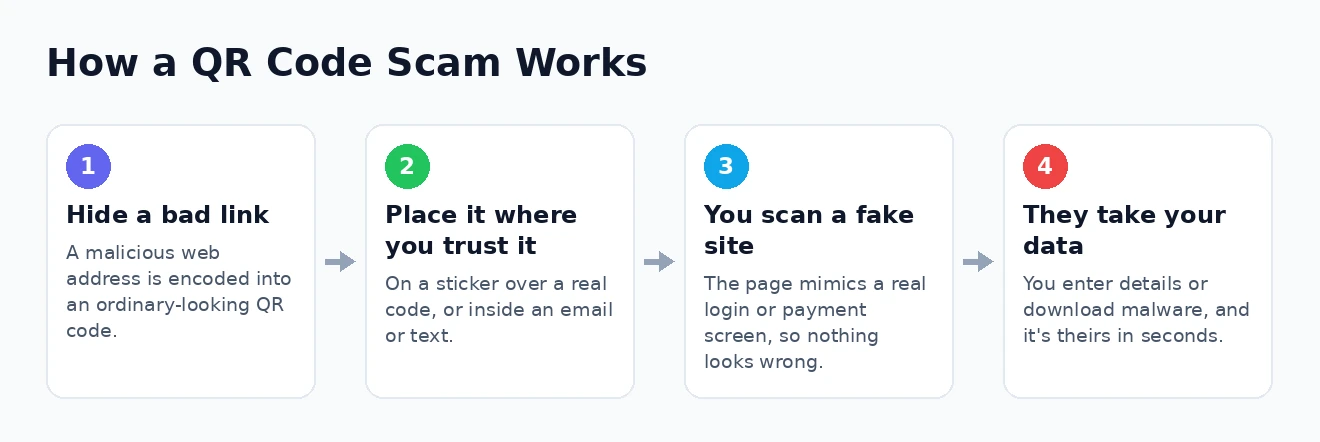
These scams follow a predictable pattern, and seeing it laid out makes the danger — and the defence — much clearer. A typical quishing attack unfolds in four steps.
- The scammer hides a bad link. They encode a malicious web address into an ordinary-looking QR code that leads to a fake site under their control.
- They place it where you will trust it. The code goes somewhere convincing — a sticker over a genuine code, an official-looking email, or an urgent text.
- You scan and land on a fake site. The page mimics a real login screen, payment form, or delivery portal, so nothing looks amiss.
- They take your data or money. You enter your credentials or card details, or download something, and the information — or the malware — is theirs.
The whole scheme hinges on placing the code where your guard is down, and the final step happens in seconds — by the time you sense something is wrong, you may have already handed over a password. Recognising the fake site for what it is remains your best defence, which is where knowing how to check whether a website is safe pays off.
Where These Scams Are Showing Up
Part of what makes quishing tricky is the range of places it appears — criminals put their codes wherever people already expect a legitimate one. These are the settings turning up most in recent warnings.
- Parking meters and restaurant tables. A fake QR sticker is placed over the real one, so a routine payment lands on a lookalike page that harvests your card details.
- Unexpected packages. A parcel you did not order contains a code with instructions to “scan to identify the sender,” leading to a spoofed retailer or delivery page.
- Fake delivery and toll texts. A message claims a package is held or a toll unpaid, with a QR code to “resolve” it that leads straight to a credential-stealing site.
- Account and renewal emails. An email warns your account will be suspended or must be renewed, using an embedded code to slip past spam filters and push you to a fake login.
- Travel settings. Hotel flyers, scooter docks, and fake booking emails have all been used; agencies flagged a sharp rise in travel-related scams over the 2026 summer season.
The common thread is that every one of these is somewhere you would expect a QR code to be — the scam borrows the credibility of the setting. Out and about, and especially when travelling, treat any code that asks for payment or login details with real caution. Keeping your device locked down, as in our guide to keeping your phone secure, adds another layer.
How to Protect Yourself From QR Code Scams
Defending against quishing needs no special software — just a little awareness and one or two firm habits. Put these into practice and you will sidestep the overwhelming majority of QR code scams.
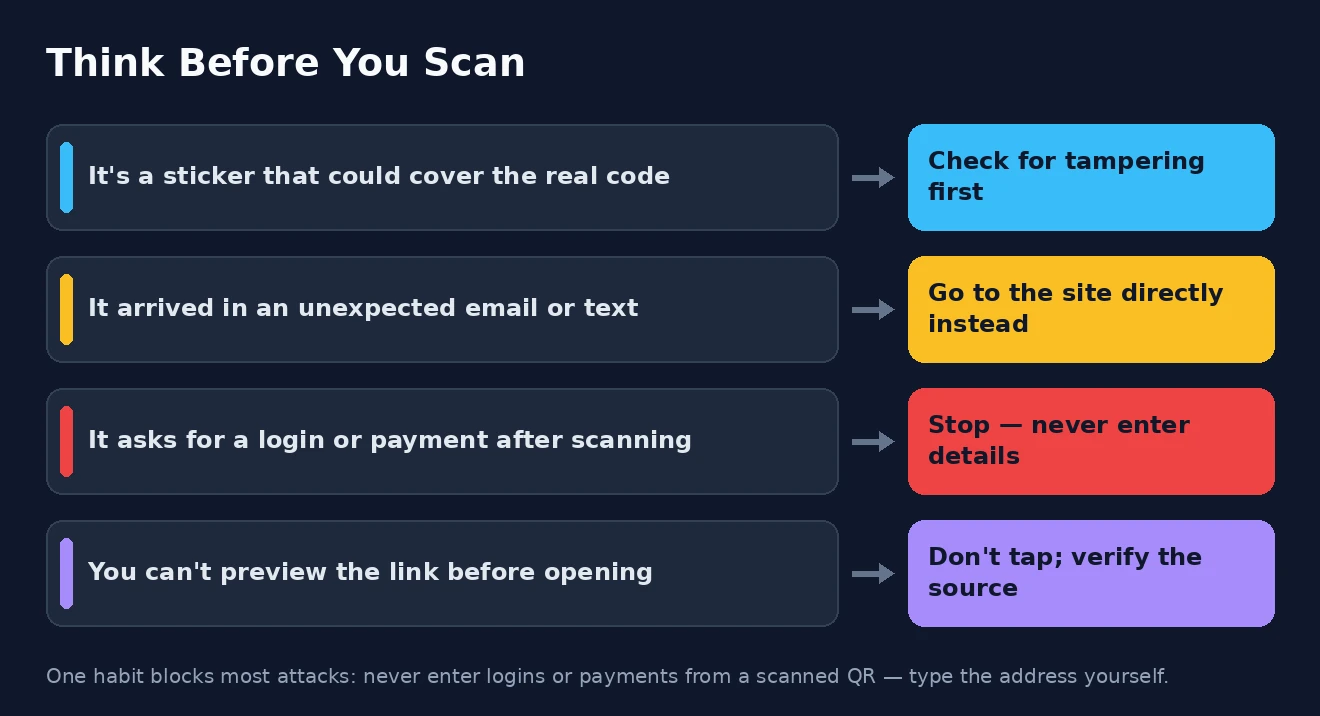
- Preview the link before you open it. Most phone cameras show the address before you tap. Read it, and make sure it matches the official site exactly — watch for subtle misspellings or odd domains.
- Never enter logins or payments from a scanned code. If a code takes you to a page asking for your password or card details, stop, open your browser, and go to the official site or app directly.
- Check physical codes for tampering. If a QR code is a sticker sitting on top of another, or looks added after the fact, do not scan it.
- Be wary of unsolicited codes. Treat any code arriving in an unexpected text or email as suspect, and avoid scanning it on your personal phone.
- Verify through another channel. If a code claims to be from your bank or a delivery service, confirm through a known number or their official site before acting.
If you remember only one thing, make it this: never enter a password or payment after scanning a QR code from a poster, sticker, or message. Go to the official website yourself and type the address in. That single habit defeats nearly every quishing attempt.
It also helps to make your accounts resilient even if a scammer does get a password. Turning on two-factor authentication means a stolen credential alone is not enough, and the same care you bring to shopping online safely applies directly here.
What to Do If You Scanned a Scam QR Code
If you scanned a code and realised too late that something is wrong, do not panic — but act quickly, because speed limits the damage.
- Stop immediately. Close the page and enter nothing further. If you have not typed anything, you may have avoided harm entirely.
- Change any password you shared and turn on two-factor authentication for that account.
- Contact your bank or card provider to flag or dispute charges. Card payments can often be disputed, but money sent by wire or cryptocurrency is very hard to recover, so report fast.
- Run a security scan if you were prompted to download or install anything, and remove whatever it added.
- Report it to the authorities, and if you found a tampered code in a shop or car park, tell the business so they can remove it.
Reporting matters more than people realise: it helps agencies track these campaigns and get fraudulent sites taken down faster. In the United States you can report to the FTC website and the FBI Internet Crime Complaint Center website, both of which have resources you may find useful.
QR Code Scams: Frequently Asked Questions
Are QR codes safe to scan?
QR codes themselves are harmless — they are just a shortcut to a web address. The risk lies in where a code leads. A code from a trusted, untampered source is generally fine; the danger comes from codes on stickers, in unexpected messages, or anywhere the destination is hidden and unverified.
How do I know if a QR code is a scam?
Warning signs include a code on a sticker that may be covering another, a code arriving in an unsolicited text or email, and a scanned page that immediately demands your login or payment details. If you cannot preview the link, or the address does not match the official site, treat it as a scam.
What happens if I scan a malicious QR code?
Scanning alone usually just opens a web page — the harm comes from what you do next. The fake site may try to trick you into entering credentials, or prompt a malware download. If you scanned but entered nothing and downloaded nothing, you have most likely avoided any damage.
How do I report a QR code scam?
In the United States, report to the FTC and the FBI’s Internet Crime Complaint Center. If a tampered physical code is involved, alert the business where you found it. Reporting quickly to your bank or card provider gives the best chance of recovering any money.
QR code scams rely on a split second of unthinking trust — and that is something you can take back. Preview links before opening them, never enter a password or payment from a scanned code, check public codes for tampering, and verify anything that feels off. Do that, and the humble QR code stays a convenience rather than a trap.