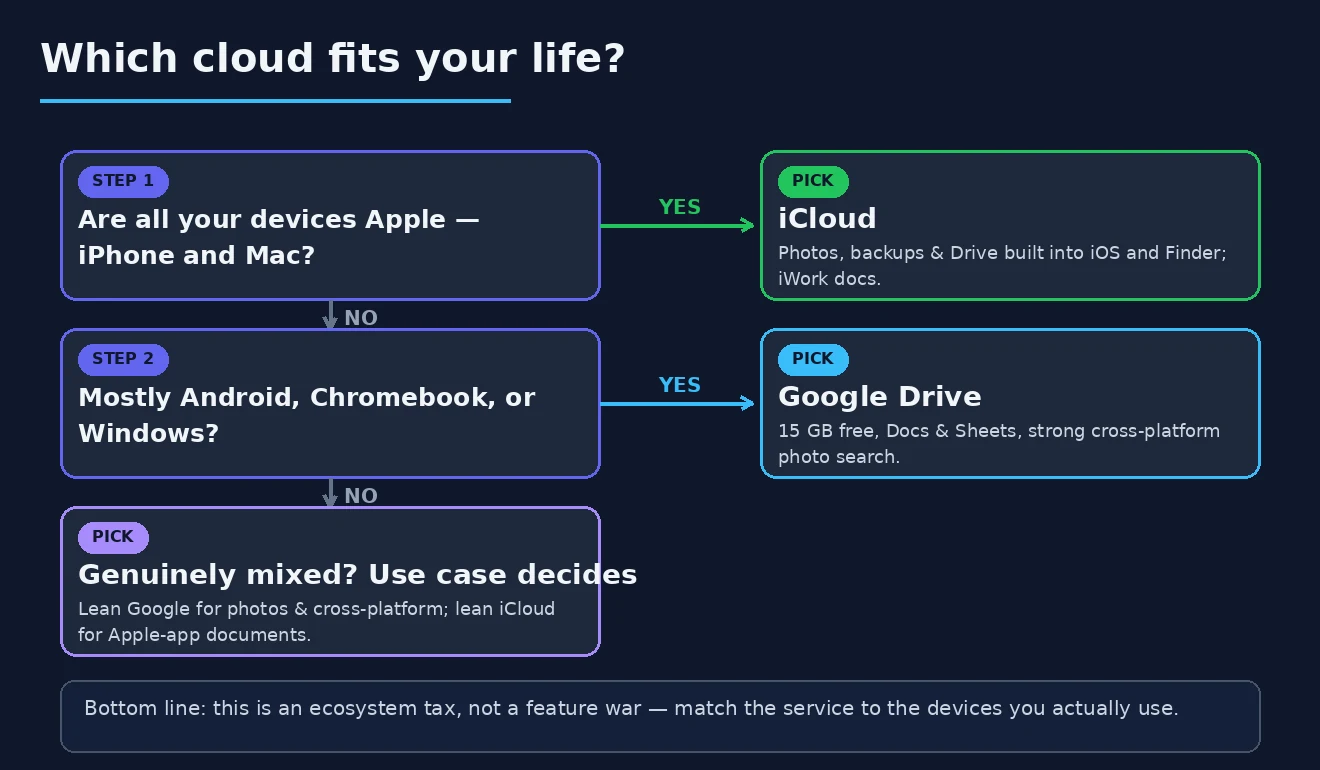
The honest framing for iCloud vs Google Drive is that these are not really competing as standalone services. You pay an ecosystem tax based on which devices you use, and the comparison only matters at the edges where your device usage is genuinely mixed. iPhone and Mac users effectively pay iCloud — the integration is so deep into iOS and macOS that using anything else creates friction every day. Android and Chromebook users effectively pay Google Drive — the integration with Android and Google services makes the choice obvious. Detailed feature comparisons mostly miss this dynamic and produce false equivalencies between services whose actual positioning depends entirely on context.
The other framing point worth establishing is that “cloud storage” describes several different use cases that the products handle differently. Photo backup is operationally different from document collaboration is different from cross-device file sync is different from family sharing. The right service depends partly on which use case dominates your needs alongside which devices you actually use.
This guide is structured around honest device context first, then the specific use case differences. For broader context on the cloud storage and file management software stack, our guide to the best software and apps covers the adjacent categories.
The Diagnostic: Which Devices You Actually Use
Before comparing iCloud vs Google Drive as if the choice were genuinely open, the honest questions about device context.
What phone do you use? iPhone users get iCloud configured by default and integrated into nearly every iOS app. Photos save to iCloud Photos automatically. Backups go to iCloud automatically. Documents in Apple apps save to iCloud Drive automatically. Using Google Drive on iPhone works but is consistently more friction than using iCloud. Android users have the equivalent default to Google services — Google Photos auto-backup, Google Drive integration in Android apps, the broader Google ecosystem assumption. Using iCloud on Android is technically possible but operationally awkward.
What computer do you primarily use? Mac users benefit substantially from iCloud Drive integration — Finder shows iCloud folders natively, system features assume iCloud as the default cloud, and the experience is genuinely smooth. Windows users with iCloud have functional but less polished integration through the iCloud for Windows app. Mac users with Google Drive have the same dynamic in reverse — functional integration that does not match the native iCloud experience.
How mixed is your household device situation? Single-ecosystem households (everyone uses iPhones and Macs, or everyone uses Android and Windows) have clear answers. Mixed households where some family members are on iOS and others on Android face the realistic challenge that neither service serves the whole family equally. The compromise often involves family members using their device-aligned service for personal content with shared services (Google Photos, third-party tools) for family-wide content.
Do you use specific services that assume one ecosystem? Photo sharing platforms, third-party photo printing services, document collaboration tools, and various other services often assume specific cloud storage. Heavy users of services that integrate primarily with Google Drive benefit from being on Google Drive; users of services that work primarily with iCloud benefit from iCloud.
For users whose answers reveal a clear device context, the cloud storage choice follows from the broader context rather than from feature comparison. For users with genuinely mixed contexts — Mac + Android, iPhone + Windows, multiple devices across platforms — the genuine comparison below matters more.
iCloud for Apple-Ecosystem Users
iCloud (apple.com/icloud; free 5 GB included with Apple ID, iCloud+ 50 GB at $0.99/month, 200 GB at $2.99/month, 2 TB at $9.99/month, 6 TB at $29.99/month, 12 TB at $59.99/month) is the right cloud storage for users primarily using Apple devices. The service is so deeply integrated into iOS, iPadOS, and macOS that using anything else for the use cases iCloud handles produces ongoing friction.
The case for iCloud specifically in the Apple ecosystem is the friction elimination. iCloud Photos automatically backs up every photo and video from every Apple device, with the same library accessible from iPhone, iPad, and Mac. iCloud Drive stores documents from Apple apps automatically. Device backups happen automatically without user intervention. The Apple Photos app, Files app, and integration across all Apple apps assumes iCloud as the default.
The strengths beyond the integration are real. The end-to-end encryption for many iCloud data types (when Advanced Data Protection is enabled) means Apple cannot read the content even if compelled. The family sharing features handle realistic household use better than most alternatives. The Find My integration that depends on iCloud is genuinely useful for locating lost devices. The cellular-data backup option ensures backups happen even when you forget to connect to wifi.
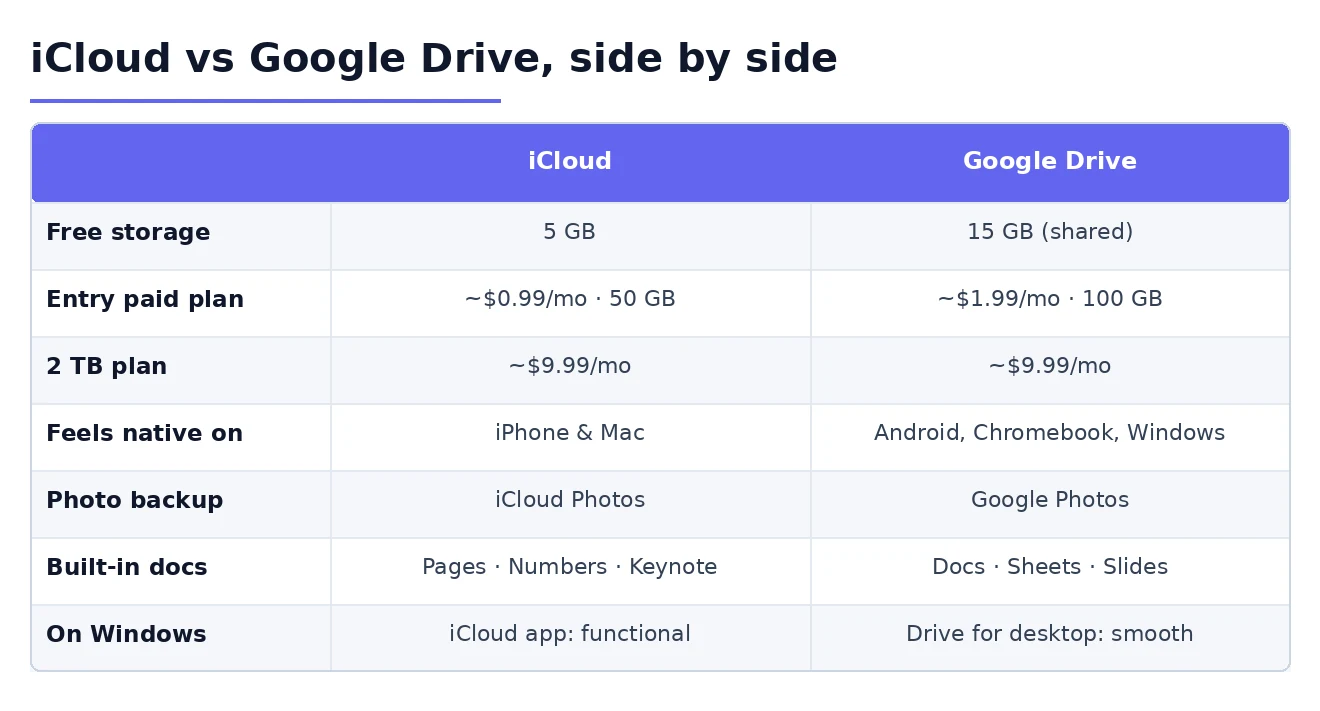
The pricing structure is reasonable for the integration value. The 5 GB free tier is genuinely small in 2026 — most users will need to upgrade — but the paid tiers are competitive with alternatives. The 200 GB tier at $2.99/month handles most personal use cases. The 2 TB tier at $9.99/month covers families with substantial photo libraries. The included features in iCloud+ (Private Relay, Hide My Email, custom email domain) add genuine value beyond just storage.
The honest concerns with iCloud are about cross-platform support and specific feature gaps. The Windows experience through iCloud for Windows is functional but not pleasant. The web access at icloud.com handles basic file management but is not equivalent to the native applications. The collaboration features for shared documents are weaker than Google’s equivalent. The integration with third-party tools is more limited than Google Drive’s broad ecosystem support.
For users primarily on Apple devices with modest collaboration needs, iCloud is the strong default. For users wanting strong cross-platform support or extensive third-party integration, Google Drive serves better. Our cloud storage for business comparison covers the broader category for users whose needs extend beyond personal use.
Google Drive for Non-Apple and Cross-Platform Users
Google Drive (drive.google.com; free 15 GB included with Google account, Google One 100 GB at $1.99/month, 200 GB at $2.99/month, 2 TB at $9.99/month, 5 TB at $24.99/month) is the right cloud storage for users on non-Apple devices, mixed ecosystems, or specifically valuing cross-platform consistency and integration with third-party tools.
The case for Google Drive specifically is the genuine cross-platform parity and the integration ecosystem. The experience on Windows, Mac, Linux, Android, iOS, and ChromeOS is consistent in ways iCloud cannot match for non-Apple platforms. The integration with Google Workspace tools (Docs, Sheets, Slides) provides collaboration capability that exceeds what iCloud offers. The integration with third-party applications is genuinely broad — many tools assume Google Drive as a default cloud storage option.
The strengths beyond cross-platform support are real. The collaborative editing in Google Docs, Sheets, and Slides is genuinely better than the Apple equivalents. The search across Google Drive is powerful — Google’s search expertise applies to file content as well as filenames. The mobile apps work well across platforms. The Google Photos integration handles the photo backup use case well, with strong search and organisation features.
The pricing is competitive and the tier structure is reasonable. The 15 GB free tier is more generous than iCloud’s 5 GB. The 100 GB tier at $1.99/month handles modest personal use. The 2 TB tier at $9.99/month matches iCloud’s equivalent. The Google One subscription includes additional features beyond storage (VPN at higher tiers, Google Pixel device discounts, family sharing) that add some value.
The honest concerns with Google Drive are about the privacy positioning and the Google services dependency. Google’s business model is based substantially on advertising informed by user data, which produces ongoing concerns about how content stored in Google Drive may be analysed. The company has made commitments about not using personal Google Drive content for advertising, but the broader trust posture differs from companies like Apple whose business model does not depend on user data. For users with elevated privacy concerns, Google Drive may not match their values even when the technical capability is competitive.
The dependency on Google services is real. Account lockout from Google services (which has happened to users for various reasons over the years) can lose access to Google Drive content along with email, photos, and other services simultaneously. The recovery process for locked accounts has improved but remains a concern for users whose entire digital life depends on Google.
For users not in the Apple ecosystem, for cross-platform households, or for users valuing third-party integration ecosystem, Google Drive is the strong default. Our cloud backup service comparison covers the related backup category that often complements cloud storage.
Photo Backup: The Use Case That Often Drives Choice
One specific use case worth highlighting: photo backup is what drives many cloud storage decisions, and the two services handle it differently in ways that affect daily use.
iCloud Photos integration with iOS, iPadOS, and macOS is genuinely smooth. Photos taken on iPhone appear on iPad and Mac without manual action. Edits made on any device appear on all devices. The library is unified across the Apple ecosystem in ways that produce a consistent experience. For users with multiple Apple devices, iCloud Photos handles the realistic photo workflow with minimal friction.
Google Photos integration with Android and Google services handles the equivalent role with similar smoothness for non-Apple users. The cross-platform support means Google Photos works equally well across all platforms — the Mac and Windows apps for Google Photos are functional in ways iCloud Photos on Windows is not. For users with mixed-platform photo workflows, Google Photos handles the case better than iCloud.
Google Photos has historically had superior search and organisation features — finding “photos with my dog from last summer” works better than the iCloud Photos equivalent. The AI-based photo analysis (faces, places, things, text within images) is genuinely useful and consistently impressive. iCloud Photos has improved its search and organisation features in recent years but still does not fully match Google’s depth.
The privacy positioning differs substantially. iCloud Photos can use end-to-end encryption when Advanced Data Protection is enabled, meaning even Apple cannot view your photos. Google Photos does not offer equivalent end-to-end encryption — Google can technically access photo content, which is what enables the search and organisation features. For users with significant photo privacy concerns, this difference matters substantially.
The pricing differs in subtle ways. iCloud Photos counts against your iCloud storage. Google Photos historically had unlimited “high quality” storage that has been replaced by counting all photos against Google Drive storage. For users with substantial photo libraries, the storage costs become meaningful in both services.
The realistic recommendation for photo backup specifically: iCloud Photos for Apple-only households where privacy matters, Google Photos for cross-platform households where search and organisation features matter, both services for users whose photo workflows justify the redundancy.
Cross-Platform Reality: When Neither Is Ideal
For users with genuinely mixed device contexts — Mac users with Android phones, iPhone users on Windows computers, families with both iOS and Android devices — neither iCloud nor Google Drive serves the entire workflow ideally. The realistic responses to this situation.
Accept the friction of cross-platform use. Using iCloud on Windows is functional even if not ideal. Using Google Drive on Apple devices works adequately even though it does not match native integration. For users who value being in one consistent ecosystem despite mixed devices, accepting some daily friction is often better than spreading content across multiple services.
Use both services for different content categories. Photos in one service, documents in another, archives in a third — splitting content by category can produce better results than forcing everything into one service that does not fit the whole workflow. The cost of multiple subscriptions adds up but may be worth it for the workflow benefits.
Use third-party services that are genuinely cross-platform-equal. Dropbox, OneDrive, Sync.com, and similar services treat all platforms as first-class citizens rather than favouring any specific ecosystem. For users whose primary need is cross-platform consistency, these alternatives often produce better results than either ecosystem-aligned service.
The honest assessment is that cross-platform households face genuine trade-offs that single-ecosystem households do not. Picking one service is a compromise; using multiple services adds complexity. There is no perfect answer; the right choice depends on which trade-off you prefer to accept. Our file sync software comparison covers the alternatives that target the cross-platform-equal positioning specifically.
Family and Sharing Considerations
For families specifically, the realistic considerations about iCloud vs Google Drive go beyond personal preference.
iCloud Family Sharing handles up to 6 family members with shared storage plans, shared photo libraries (Shared Library feature), shared purchases across the App Store and other Apple services, and family-wide features like Find My. For all-Apple households, the family integration is genuinely smooth.
Google One family sharing similarly handles up to 5 family members with shared storage, shared family photos through specific Google Photos features, and family-wide access to Google One benefits. For all-Google households, the integration works equivalently well.

For mixed households, neither service handles the family case ideally. The realistic compromises involve either accepting that some family members use less-natively-integrated services on their devices, or using multiple services with explicit sharing between them. The complexity of mixed-household cloud storage is genuine and often resolved through hybrid approaches rather than single-service adoption.
The Privacy and Encryption Considerations
One specific aspect worth covering: the privacy postures and encryption approaches of iCloud and Google Drive differ substantially in ways that matter for some users.
iCloud with Advanced Data Protection enabled provides end-to-end encryption for most iCloud data types including iCloud Drive, iCloud Photos, Notes, Reminders, Safari Bookmarks, and various other categories. Apple cannot decrypt this content even if compelled by legal process. For users with elevated privacy needs, this is a meaningful security improvement that Google Drive does not provide.
Google Drive uses encryption in transit and at rest, but the encryption keys are managed by Google rather than only by the user. Google can technically access user content under certain circumstances (legal compulsion, abuse investigations, technical maintenance). The actual privacy implications for typical users are modest, but for users with specific privacy threat models, the difference matters.
The implication for users with privacy concerns is that iCloud with Advanced Data Protection provides stronger privacy guarantees than Google Drive for most data types. For users whose threat model includes concerns about service provider access to data, this matters. For users without such specific concerns, the practical privacy difference is more modest than the technical difference suggests. Our secure file sharing software comparison covers the related category for users wanting stronger sharing-specific privacy.
The Practical Recommendation
For most users in 2026, the answer follows from device ecosystem rather than from feature comparison. Apple ecosystem users with iPhone and Mac: iCloud as the strong default that aligns with the broader device experience, with paid tier as needed for storage requirements. Non-Apple users on Android, Chromebook, or Windows: Google Drive as the natural default that aligns with broader Google or Android ecosystem use. Cross-platform households or users with genuinely mixed device contexts: accept friction with one service, use multiple services for different content categories, or consider third-party cross-platform-equal alternatives (Dropbox, OneDrive). Users specifically focused on photo backup: iCloud Photos for Apple households with privacy emphasis, Google Photos for cross-platform households with search-and-organisation emphasis. Users with elevated privacy concerns: iCloud with Advanced Data Protection enabled for the end-to-end encryption that Google Drive does not provide. The wrong move is treating iCloud vs Google Drive as a feature comparison rather than as an ecosystem decision, because the right service depends on the broader device context more than on detailed feature differences. Match the cloud storage to your actual device ecosystem, recognise that mixed-device contexts require compromises that single-ecosystem users do not face, and the service becomes infrastructure that supports your daily computing rather than ongoing friction to navigate.