Most users fail at task management for a reason no app can solve. They confuse two genuinely different problems and pick a tool to address one when their actual difficulty is the other. The capture problem is “I forget what I need to do” — any reasonable task management app solves this trivially by giving you a place to write things down and find them later. The action problem is “I have a list of tasks but I do not actually do them” — this is a discipline and prioritisation problem that no app addresses regardless of how sophisticated the features are. Users with the action problem who buy increasingly elaborate task management apps are essentially trying to solve a discipline issue through software, which reliably fails.
The first honest question for anyone searching this category is which problem you actually have. If you genuinely lose track of what needs to be done and a simple capture system would help, the recommendation is very different from someone who already remembers what they need to do but does not do it. The former needs a working capture tool; the latter needs to address the underlying reason their captured tasks remain undone, which is not a tool selection problem.
This guide is structured around honest self-assessment first and then tool recommendations for genuine capture-side problems. For broader context on the productivity software stack that task management sits within, our guide to the best software and apps covers the adjacent categories.
Diagnostic Questions Before Choosing a Tool
Before recommending specific task management apps, the questions that identify what kind of help you actually need.
Do you forget important things, or do you remember them but procrastinate? Forgetting suggests a capture problem that tools can solve. Procrastinating suggests an action problem that tools cannot solve. Many users assume they have the former when they actually have the latter, which is why their apps fill with overdue tasks they have not addressed.
Does your current system fail at capture (tasks not being recorded) or at execution (tasks being recorded but not done)? Look at your existing setup, whatever it is. If most of what you need to do gets written down somewhere but does not happen, the bottleneck is not capture. If important things slip through entirely without being recorded, capture is genuinely your problem.
How many tasks do you typically have in flight at once? Small numbers (5-15 active items) work with essentially any tool including paper notes. Large numbers (50-200 active items) need search, organisation, and filtering features that simple tools handle poorly. Very large numbers (500+ items) often indicate hoarding rather than meaningful tracking — most of those items are not actually going to get done, and the system would work better with aggressive pruning than with more sophisticated tools.
Do you work alone or do tasks need to coordinate with others? Solo task management has different requirements from shared task management. Tools optimised for one work poorly for the other, and confused workflows where personal and shared tasks live in the same system often produce friction for both purposes.
Do you have time-blocked appointments alongside flexible tasks? Calendar items (time-bound, must happen at specific moments) and tasks (must happen but flexible about when) are different categories that some tools handle well in unified views and others handle awkwardly. The mix matters for tool choice.
For users whose answers identify genuine capture-side problems, the recommendations below apply. For users whose answers reveal action-side problems, no recommendation below will help — addressing the underlying execution issues matters more than tool selection.
For Simple Solo Capture: Todoist
Todoist (todoist.com; free tier with 5 personal projects, Pro at $4/month or $36/year annually) is the right task management app for solo users with genuine capture needs who want a tool that works across all devices without elaborate setup. The product has been refined over many years specifically for the capture-and-organisation use case.
The case for Todoist specifically is the combination of cross-platform reliability and natural-language capture. The apps work essentially the same on Windows, Mac, iOS, Android, web, and various integrations. The natural language parsing — typing “Submit report Tuesday” automatically schedules the task for next Tuesday — produces capture that is genuinely fast. The keyboard shortcuts on desktop and the mobile widgets make adding tasks frictionless.
The strengths beyond capture are real but appropriately modest. The Projects organisation handles grouping related tasks without imposing structure that does not fit your work. The Labels and Filters let you create custom views (everything tagged @home, everything due today, everything in the office project that has high priority) that match how you actually want to look at your tasks. The Karma gamification is optional and can be turned off if you find it annoying rather than motivating.
The honest concerns with Todoist are about the pricing model and the feature ceiling. The free tier is genuinely usable but limits you to five active projects, which is restrictive for users with more complex work. The Pro tier at $36/year is reasonable but adds up to subscription cost that other tools handle in their free tiers. The feature set is intentionally focused on personal task management — Todoist is not the right tool for team coordination or complex project management.
For solo users with genuine capture problems who want a working tool without complexity, Todoist is the strong default. The alternatives below serve specific use cases where Todoist’s focus does not match the need.

For Power Users Who Want More: TickTick
TickTick (ticktick.com; free tier with substantial capability, Premium at $35.99/year) is the alternative for users who want more than Todoist provides at similar pricing. The product positioning is intentionally feature-rich for personal task management — features that Todoist keeps simple, TickTick provides more options for.
The case for TickTick specifically is when Todoist’s intentional simplicity feels limiting. The built-in calendar view, the Pomodoro timer integration, the habit tracking features, and the more elaborate organisation options all matter for users whose workflow involves more than just task lists. For users wanting a more comprehensive personal productivity tool, TickTick covers more ground without requiring multiple apps.
The strengths beyond breadth are real. The cross-platform sync works as reliably as Todoist’s. The mobile apps are genuinely well-designed. The free tier includes meaningfully more than Todoist’s free tier — multiple lists, custom filters, basic recurring tasks. For users who would otherwise pay for Todoist Pro, TickTick’s free tier often handles the same needs.
The honest concerns are about feature complexity. TickTick provides more options than Todoist, which means more configuration decisions and more visual complexity in the interface. For users who appreciated Todoist’s simplicity, TickTick’s additional features can feel like distractions rather than benefits. The choice between the two is largely about whether you want intentional minimalism or feature-richness.
For users who tried Todoist and found it too limiting, TickTick is the natural next consideration. For users who tried Todoist and liked the simplicity, TickTick is more complexity than helps.
For Mac and iOS Users: Things 3
Things 3 (paid one-time purchase: $49.99 Mac, $9.99 iPhone, $19.99 iPad; culturedcode.com) is the task management app for Apple-platform users who specifically want a product designed with deep platform integration and considered design. The pricing model is unusual in the modern subscription-everything environment — pay once for each platform, no ongoing subscription.
The case for Things 3 specifically is the design quality and the no-subscription model. The product is genuinely well-designed in ways that affect daily use — keyboard shortcuts that match Apple platform conventions, smooth animations that feel natural, integration with iOS and macOS features that bolt-on apps cannot achieve. For users who care about design quality and use Apple platforms exclusively, Things 3 produces a daily experience that the cross-platform alternatives cannot match.
The no-subscription model is genuinely friendly for long-term users. Buying Things 3 for Mac, iPhone, and iPad costs $80 total — comparable to two years of Todoist Pro subscription. For users who plan to use the tool for many years, the total cost of ownership is substantially lower than subscription alternatives over time.
The realistic limitations are about the Apple-only positioning and the conscious feature minimalism. Windows and Android users cannot use Things 3, which makes it inappropriate for cross-platform households or for users who might switch platforms. The feature set is intentionally simpler than Todoist or TickTick — no labels, no extensive integrations, less elaborate filtering. For users wanting power features, Things 3 is the wrong product.
For Apple-platform users who specifically value design quality and prefer one-time purchases to subscriptions, Things 3 is the strong choice. For cross-platform users or those wanting feature breadth, the alternatives serve better.
For Microsoft 365 Users: Microsoft To Do
Microsoft To Do (free; included with Microsoft accounts; to-do.live.com) is the task management app for users specifically committed to the Microsoft ecosystem. The product is free, integrates with Outlook flagged emails, syncs across Microsoft accounts, and handles the basic task management use case adequately for users who want one less subscription.
The case for Microsoft To Do specifically is the combination of free pricing and Microsoft 365 integration. For users whose work email is in Outlook, flagging emails to convert them into tasks happens through the natural Outlook workflow rather than requiring a separate app. The cross-device sync uses your Microsoft account, which most Microsoft 365 users already have configured.
The realistic limits of Microsoft To Do are about feature ceiling. The product handles basic capture and list organisation but does not match Todoist or TickTick on more sophisticated features. For users with substantial task management needs, the limitations matter; for users whose needs are modest, the free pricing and Microsoft integration produce adequate results.
For Microsoft 365 users with modest task management needs, To Do is a credible free default. For users with more sophisticated requirements, the paid alternatives produce more capability for the cost.
For Team Task Coordination: Different Tools Entirely
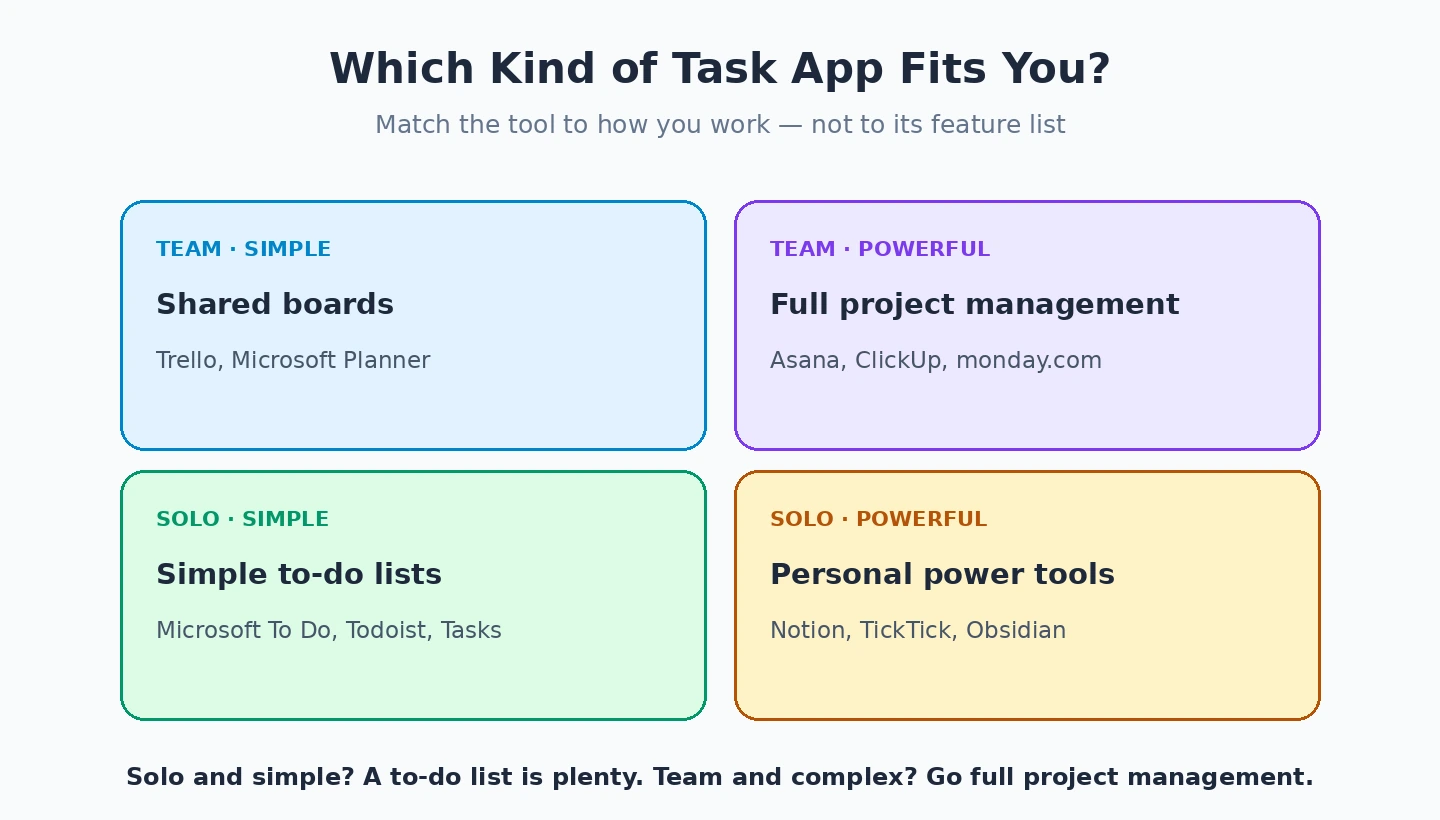
One framing point worth making explicitly: solo task management apps and team task coordination tools are different categories. Most of the apps above are optimised for personal use; using them for team coordination produces friction. Tools optimised for team coordination handle the personal use case adequately but with more complexity than solo users need.
For teams coordinating work, the relevant tools are project management platforms (Asana, Trello, Monday.com, Linear, Notion) rather than personal task managers. The team-oriented tools handle shared visibility, assignment of tasks to specific people, status reporting across team members, and the coordination workflow that personal tools do not address well.
For individuals on teams using these tools, the realistic recommendation is often two systems — the team tool for shared work and a personal task manager for individual capture. The personal capture handles things that should not clutter team visibility (personal errands, ideas to think about, etc.); the team tool handles work others need visibility into. Trying to use one tool for both purposes typically produces friction for at least one of them. Our project management software comparison covers the team-oriented tools in depth.
For OmniFocus and the Power-User Niche
OmniFocus (Mac and iOS only; $39.99 Standard or $99.99 Pro for one-year subscription, $74.99 Standard or $149.99 Pro for perpetual; omnigroup.com) is the task management app for the specific power-user niche that practises Getting Things Done (GTD) methodology rigorously. The product is the most thorough GTD implementation available, supporting the full methodology with capability that lighter tools cannot match.
The case for OmniFocus specifically is for users genuinely practising GTD as a methodology rather than informally borrowing its concepts. The Perspectives feature for custom views of your task list, the comprehensive Contexts/Tags system for organising by location or energy level, the Forecast view that integrates with calendar — all of these matter for users whose work demands sophisticated personal task organisation.
The realistic positioning is that OmniFocus is overkill for most users. The capability genuinely matches what serious GTD practitioners need; users not practising rigorous GTD typically use a fraction of the features while paying for the depth. For users who specifically practise GTD or have job requirements that demand sophisticated personal task organisation (consultants juggling many client engagements, executives with complex commitments), OmniFocus is the right tool. For typical users, the simpler alternatives produce equivalent functional results with less complexity.
The Paper Alternative That Some Users Should Consider
One framing point worth making explicitly: for some users, paper-based task management produces better outcomes than any app. This is genuinely true rather than nostalgic — research on cognitive load and attention has shown that physical notebooks produce specific benefits that screens do not.
The case for paper specifically is when the limitations of paper are features rather than bugs. Paper requires intentional engagement (you cannot quickly check it while doing something else, which reduces context-switching). Paper is not searchable, which forces you to review your notes regularly to find what you wrote (which is often when you actually re-engage with old tasks). Paper does not produce notifications, which lets you control when you engage with your task list rather than reacting to alerts.
The bullet journal methodology specifically has produced substantial communities of users who find that the rigour of writing tasks by hand, regularly transferring active items to new pages (which forces honest pruning of what you are not actually going to do), and the absence of digital distraction produces better task management than any app. For users who have tried apps and found them ineffective, trying paper specifically rather than yet another app is worth considering.
For users committed to digital task management, this section is not a recommendation to switch. For users frustrated with their relationship with digital tools, paper is worth genuinely considering rather than dismissing. Our calendar app comparison covers the related category for users whose tasks have time-bound components.

What Task Management Apps Cannot Do
The honest framing about what these tools cannot fix regardless of which you pick.
They cannot make you do things you do not want to do. The fundamental motivation problem is not addressed by task management software; better tools just produce more detailed records of what you are not doing.
They cannot decide what should be done. The prioritisation problem requires judgement that software does not provide. Apps can support prioritisation systems you have decided on, but they do not produce the decisions.
They cannot solve overcommitment. If you genuinely have more tasks than you can do, no tool fixes this. The realistic response is reducing commitments, which is a relationship and boundary problem rather than a tool problem.
They cannot replace habits. Tasks you do regularly (daily exercise, weekly review, monthly admin) work better as habits than as recurring tasks. Apps that produce daily reminders for things you should be doing automatically without reminders are addressing the wrong problem.
They cannot fix attention problems. If you genuinely struggle with attention regulation, the realistic responses are professional support, environmental changes, or both — not more sophisticated task tracking. Apps can support work with attention issues but do not fix them.
For users whose task management failures stem from any of these underlying causes, the realistic improvements come from addressing the underlying cause rather than from changing apps. Our time tracking software comparison and team chat apps comparison cover related productivity tool categories where similar honest assessments apply.
The Practical Recommendation
For most users in 2026, the answer depends on whether you actually have a capture problem (in which case the recommendations below help) or an action problem (in which case no recommendation helps). Solo capture for cross-platform use: Todoist for the intentional simplicity, TickTick for users wanting more features at similar pricing. Apple-only users valuing design and one-time pricing: Things 3 across Mac and iOS. Microsoft 365 ecosystem users wanting free integrated tooling: Microsoft To Do. Serious GTD practitioners with sophisticated requirements: OmniFocus despite the cost and Apple-platform limitation. Team coordination needs: project management tools rather than personal task managers. Users frustrated with digital tools entirely: bullet journal or similar paper-based approaches. The wrong move is buying increasingly elaborate apps to solve action problems that no software addresses, because the underlying discipline issues remain unchanged regardless of how sophisticated the tracking becomes. Diagnose honestly whether you have a capture problem or an action problem, pick appropriately, and either invest in a working tool for capture or address the actual barriers to action that no tool reaches.