
The single biggest predictor of whether time tracking software succeeds in an organisation is not which product you pick but what the organisational culture around time tracking actually is. Time tracking tools deployed without thinking about culture either get quietly ignored by employees who view them as surveillance, or get gamed by employees who learn to make the numbers look right rather than accurately reflecting work patterns. Either failure mode means the data the organisation collects is worse than nothing, because decisions get made based on incorrect data.
This matters because the “best time tracking software” question gets approached as a feature comparison when the operational question is upstream. A team that adopts time tracking voluntarily because they genuinely want better project estimation gets enormous value from even basic tools. A team that has time tracking imposed on them because management does not trust them gets nothing useful from the most sophisticated tool available. The picking question matters; the implementing question matters more.
This guide acknowledges that upstream reality and then provides honest recommendations for teams in different cultural positions. The tools genuinely vary in how they support different cultural approaches — some work well for trust-based voluntary adoption, others are designed around monitoring and surveillance, and the wrong fit produces predictable failure. For broader context on the operational software stack a business needs alongside time tracking, our guide to the best software and apps covers adjacent categories.
The Three Cultural Postures Around Time Tracking
Three distinct postures are worth identifying because they map to different tool categories.
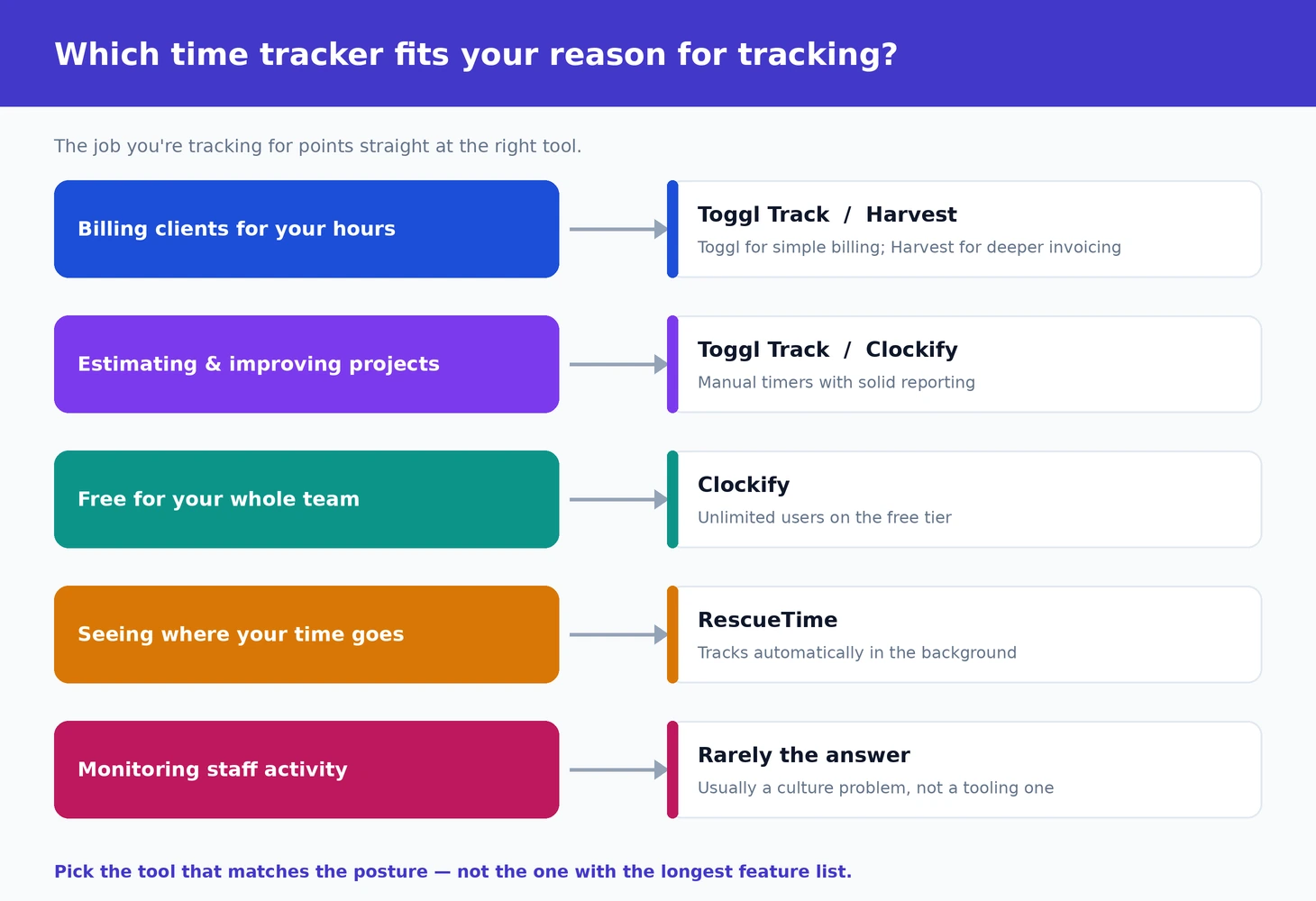
The first is billable-hours tracking for client work. Consultancies, agencies, professional services, freelancers — these businesses need accurate time records because the time is what they invoice. The cultural posture here is “we are tracking time so we can bill correctly,” which is widely accepted as a legitimate operational requirement. The tools optimised for this case prioritise speed of entry, project and client organisation, and clean invoice generation.
The second is project estimation and improvement tracking. Software teams, design teams, and similar knowledge work groups sometimes track time to learn how long different kinds of work actually take, with the goal of producing better estimates and identifying systematic inefficiencies. The cultural posture here is “we are tracking time to learn,” which works when the team is genuinely curious and breaks down when the data starts being used punitively. The tools optimised for this case prioritise easy categorisation, retrospective analytics, and integration with project management systems.
The third is surveillance — management wanting to monitor whether employees are working enough or working on the right things. The cultural posture here is “we are tracking time to verify productivity,” which produces all the dysfunctions described in the introduction. The tools optimised for this case (screen recording, keyboard activity tracking, application monitoring) are categorically different from the billable-hours and estimation tools, and recommending them is a category error in most contexts. We will cover the legitimate narrow cases where surveillance tools are appropriate, but the honest framing is that for most organisations these tools cause more problems than they solve.
Toggl Track: The Default for Billable Hours and Voluntary Tracking
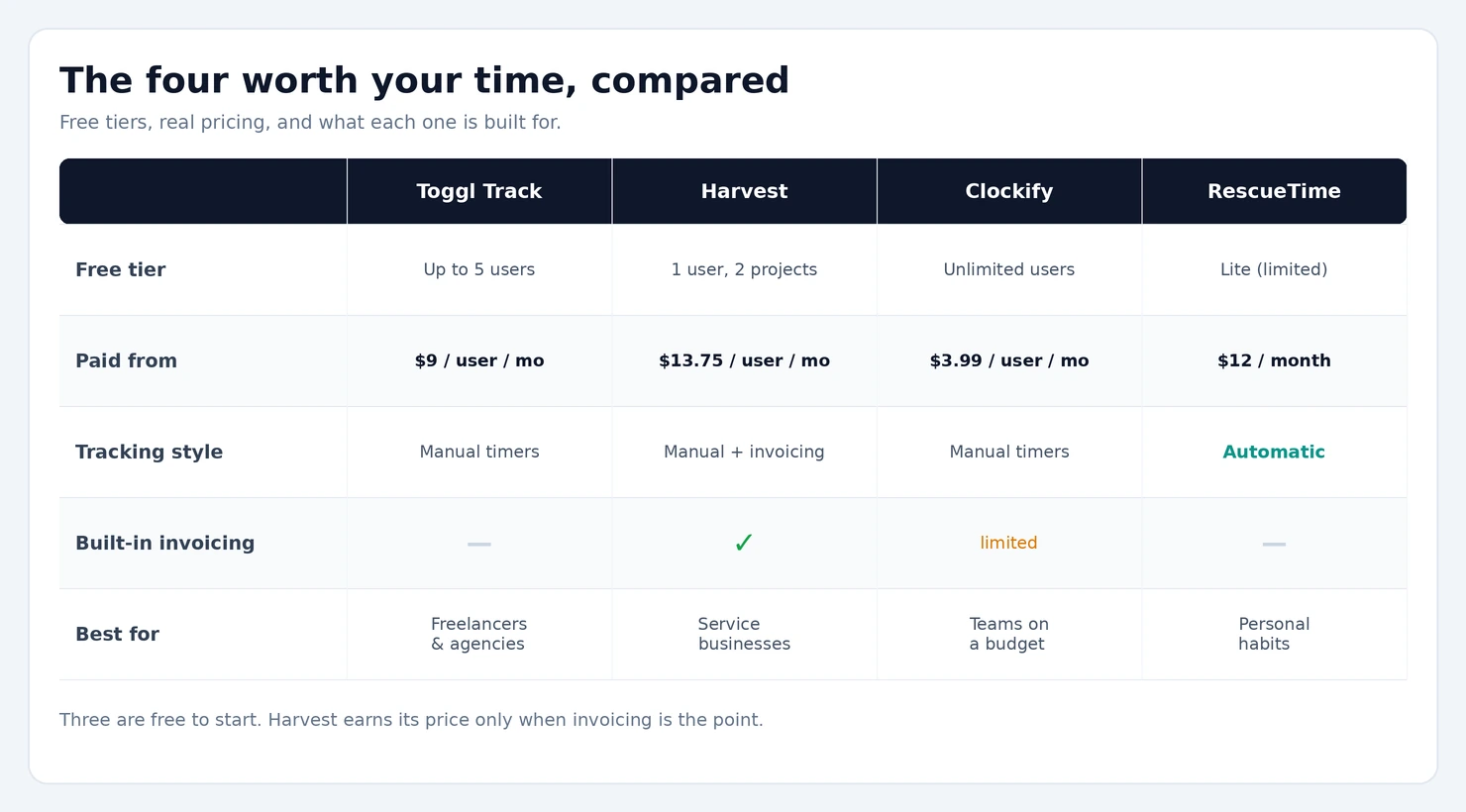
Toggl Track (free for up to 5 users with basic features, Starter plan from $9/user/month; toggl.com) is the time tracking software I recommend most consistently for the first two cultural postures — billable hours and voluntary project tracking. The product has been built around making time entry as low-friction as possible, which is genuinely the deciding factor in whether tracking actually happens versus being abandoned after a week.
The interface design matters more than the feature list. Starting a timer in Toggl takes one click. The Pomodoro-style timer integration encourages short focused work sessions. The descriptions and project assignments are kept simple enough that users can fill them in without breaking their work flow. The browser extension lets you start timers from anywhere on the web. The mobile apps work for tracking on the go. The historical data is genuinely useful for retrospective analysis.
The free tier covers most of the basics adequately for small teams or individual use. Reports, time entries, and basic project tracking are all included without limits beyond the 5-user cap. The Starter and Premium tiers add automation features, billable rate tracking with invoicing integration, and the analytics that growing teams genuinely benefit from. The pricing is competitive against alternatives that offer comparable capability.
The case against Toggl is mostly at the high end. The reporting and analytics, while good, are not as deep as Harvest’s. The project management integration is via separate tools rather than built-in. For teams whose time tracking is heavily intertwined with project management workflow, the more integrated alternatives may serve better.
For most freelancers, agencies, small consultancies, and small teams doing voluntary tracking for project insight, Toggl is the right pick. The combination of low friction, generous free tier, and reasonable paid pricing makes it the default recommendation.
Harvest: The Stronger Choice for Established Service Businesses
Harvest (free for 1 user with 2 projects, paid plans from $13.75/user/month annually; harvestapp.com) is the time tracking software for established service businesses where the time data feeds directly into invoicing and project profitability analysis. The product positioning is “professional services” rather than “general productivity,” and the feature set reflects that focus.
The strengths over Toggl are in the depth of the financial and reporting layer. Harvest’s invoice generation is genuinely good — invoices look professional, integrate cleanly with accounting platforms (QuickBooks, Xero, Wave), and handle the typical complexity of professional services billing (mixed billable and non-billable time, different rates by role, retainer arrangements). The expense tracking adds another dimension that pure time tracking tools lack.
The reporting depth is meaningful for agencies and consultancies. Project profitability reports that combine time and expenses against budgets, team utilisation analysis, and forecasting tools support business-management decisions that smaller tools cannot. For service businesses where the time data is operationally central rather than a side activity, this depth pays back.
The pricing positioning is higher than Toggl at equivalent team sizes, which is the realistic trade-off. For very small operations where the depth would be wasted, Toggl is the better-fit answer. For established service businesses where the depth gets used, Harvest justifies the price difference.
One specific feature worth noting: Harvest’s integration with Forecast (Harvest’s own resource planning product) creates a connected workflow from forecasting upcoming work, through tracking actual time spent, to invoicing and analysing profitability. For agencies managing both forward-looking capacity planning and historical analysis, this integrated approach is genuinely valuable. Our project management software comparison covers the adjacent category that often sits alongside time tracking for the broader project workflow.
Clockify: The Free Tier That Actually Scales
Clockify (free with unlimited users and most features, paid plans from $3.99/user/month for advanced features; clockify.me) is the unusual product in this category that offers genuinely useful capability free without per-user limits. For larger teams where Toggl’s 5-user free tier is too restrictive but the paid pricing per-user is expensive at scale, Clockify is the right alternative.
The feature set in the free tier covers the basics adequately — time tracking, project organisation, basic reporting, team time tracking with administrator visibility. The interface is functional rather than polished, the integrations are fewer than Toggl or Harvest, and the analytics depth is lighter. None of this changes that the free tier is genuinely usable for serious team use.
The case for Clockify specifically is when the budget pressure is real and the team is large enough that per-user pricing becomes substantial. A 30-person team using Toggl Starter at $9/user/month is $270/month; the same team on Clockify Free is $0. The capability gap is real but the cost difference is also real, and for organisations where time tracking is operationally useful but not mission-critical, the cost savings can be the deciding factor.
The case against Clockify is the polish and integration gaps. The Toggl interface is meaningfully smoother for daily entry, which affects whether tracking actually happens. The Harvest reporting depth is meaningfully deeper for analysis. For organisations that will use the time tracking data heavily, the cheaper tool may produce worse outcomes than the more expensive one.
The realistic pattern: Clockify works well for organisations where time tracking is mandatory administratively but not the centerpiece of operations. For service businesses where time data is the input to invoicing and decision-making, paying for the better tools produces better outcomes.
RescueTime: The Automatic Tracking Alternative
RescueTime (free Lite tier, Premium from $12/month or $78/year; rescuetime.com) takes a fundamentally different approach to the category by tracking application and website usage automatically rather than requiring manual timer starts. The software runs in the background, categorises your activity (productive, distracting, neutral) based on your settings, and produces reports on where your time actually went without requiring active entry.
The case for RescueTime specifically is for personal use, where the goal is understanding your own work patterns rather than producing time data for billing or team management. For freelancers wondering where the day actually went, knowledge workers trying to identify patterns that affect their focus, or anyone curious about the gap between perceived and actual time allocation, RescueTime produces useful information that manual tracking cannot match.
The case against for team or business use is significant. The application-and-website-tracking model is a step toward the surveillance posture described earlier; deployed across teams without careful cultural framing, it triggers all the dysfunctions of monitoring-based time tracking. The data is also less useful for billing because it tracks “where time was spent” rather than “what work was accomplished” — a frustrating debugging session looks identical in RescueTime to productive feature development.
RescueTime works well as a personal tool for self-reflection. It works badly as a team management tool deployed without consent or context. The line between these uses is genuinely about whether the user is choosing to use the tool for their own benefit or having it imposed on them.
The Surveillance Category: When (Rarely) It Is Appropriate
The category of explicitly monitoring software — Hubstaff, Time Doctor, Veriato, ActivTrak, and similar — that combines time tracking with screen recording, keyboard activity tracking, and application monitoring deserves separate treatment because the considerations are different from the legitimate time tracking tools above.
The honest cases where monitoring tools are appropriate are narrow. Specific contractor work where billable hours need verification because the financial stakes of inaccurate reporting are significant. Regulated industries where time records are legally required to specific standards (some legal and accounting contexts). Internal investigations into specific suspected behaviour with documented HR involvement and legal review. Personal use where someone chooses to monitor their own activity for self-improvement (RescueTime fits here better than the surveillance-marketed tools).
The cases where monitoring tools are not appropriate cover most general business use. Routine employee productivity monitoring “to make sure remote workers are working” reliably damages trust, produces gaming behaviours that make the data worse than nothing, and has not been shown in any rigorous research to improve actual productivity. Organisations that deploy these tools as general policy almost always regret it within 12 to 24 months as the cultural damage becomes apparent.
The specific products in this category vary in their aggression and their legitimate use cases. Hubstaff is the most established, with a more balanced posture than some alternatives — it offers strong tracking features but also clear documentation and consent workflows. Veriato is at the more aggressive end, marketed primarily for “insider threat” detection contexts. ActivTrak sits in the middle. None of these are tools to deploy lightly; for organisations considering them, engaging proper HR and legal review before deployment is essential.
The honest recommendation for most organisations: do not deploy surveillance tools without genuinely thinking through what problem they are supposed to solve. If the problem is “I do not trust my employees,” monitoring software does not fix it — it confirms and amplifies the distrust. If the problem is “I need to bill clients accurately for specific work,” Toggl or Harvest serve better without the surveillance trade-offs. Our help desk software comparison covers a related category where operational visibility serves legitimate purposes through opt-in rather than monitoring.
The Implementation Patterns That Determine Success
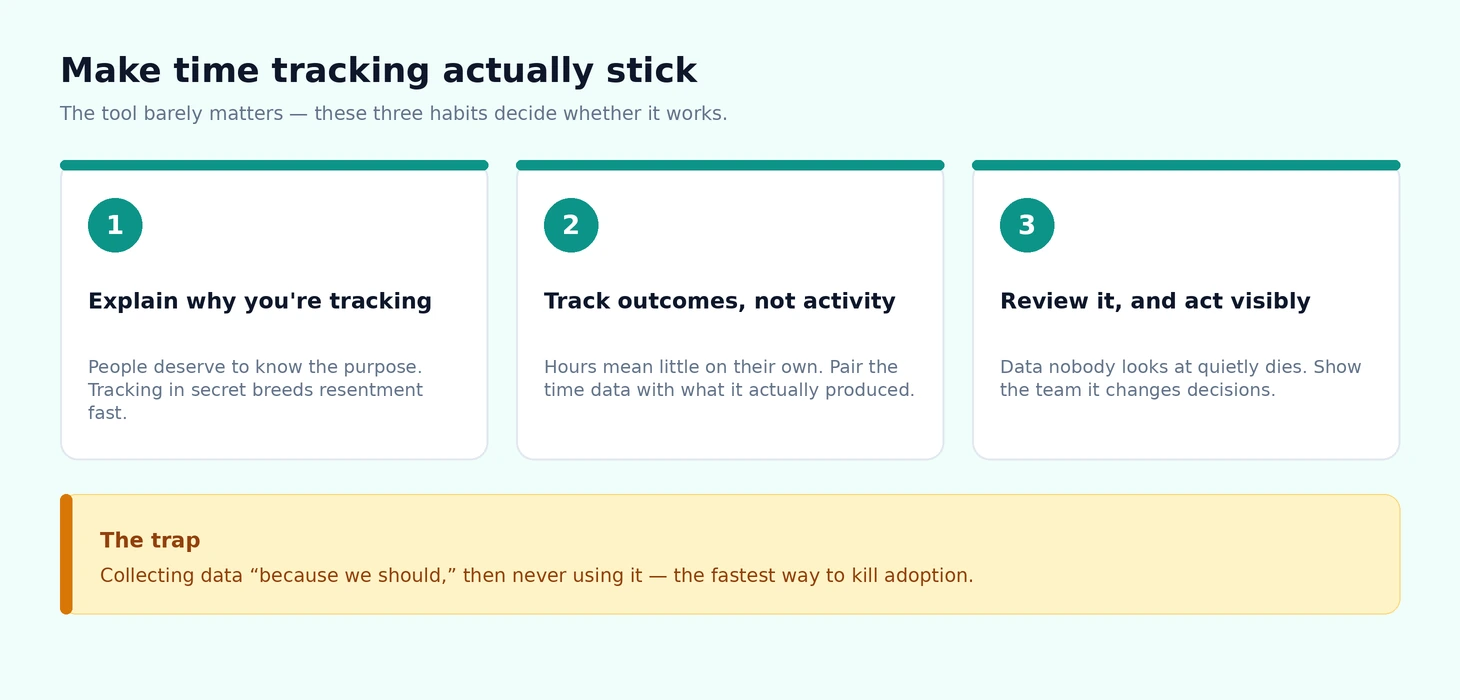
Regardless of which tool you pick, three implementation patterns separate successful time tracking deployments from failed ones.
Explain the purpose clearly. Employees and team members deserve to know why time tracking is being introduced, what the data will be used for, and what it will not be used for. The implicit contract matters — time tracking for project estimation is a different thing from time tracking for performance evaluation, and conflating them in practice (using estimation data punitively, using performance data for forecasting) destroys trust in both directions.
Track outcomes, not just activity. The time data is most valuable when paired with the outcomes that the time produced. A team that tracked 200 hours on a project that shipped on time is different from a team that tracked 200 hours on a project that did not ship. The data alone, without context, supports limited decision-making; the data with context supports genuine learning.
Review the data and act on it visibly. The fastest way to kill time tracking participation is to collect data and never use it. Teams that submit data into a black hole stop participating; teams that see the data feed into project retrospectives, estimation improvements, and decision-making continue contributing because the data demonstrably matters.
The corresponding failure pattern: collecting data because “we should be tracking time” without a specific use, and discovering after a few months that the data has produced nothing actionable. The right corrective is either finding a specific use for the data or stopping the tracking; continuing collection without use produces only resentment. Our small business CRM comparison covers another tool category where the same “use the data or stop collecting it” principle applies. Our small business accounting software comparison covers the related financial side where time-tracked billable hours typically flow into invoicing.
The Practical Recommendation
For most readers, the right answer follows from the cultural posture. For freelancers, agencies, small consultancies, and any service business where time becomes invoices: Toggl Track for the general case, Harvest if the depth of financial integration justifies the price premium. For larger teams where per-user pricing becomes substantial: Clockify free tier as a credible budget alternative. For personal use focused on self-understanding rather than billing: RescueTime. For situations that genuinely call for monitoring (narrow as they are): proper HR and legal review before picking a surveillance product, and Hubstaff as the most balanced of the options in that category. The wrong move is treating time tracking as primarily a tool choice rather than primarily a cultural and operational choice. The same tool succeeds in some organisations and fails in others, and the determining factor is rarely the software. Match the tool to the actual cultural context, implement it with transparency about purpose, use the data visibly, and the category produces real value rather than dysfunction.