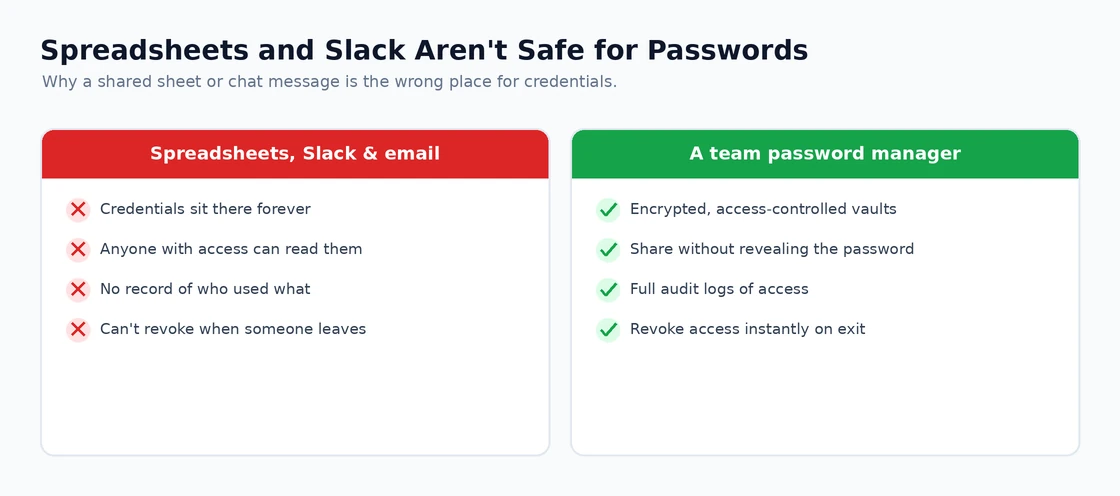
Password sharing for teams is a security problem most organisations handle poorly — either by emailing passwords (visible in inbox archives forever), pasting them into Slack (searchable by anyone with channel access), or using a shared spreadsheet (no audit trail, no rotation). The right solution is a team password manager designed to share credentials securely with proper access controls. If you want the full context, see our Best Software and Apps.
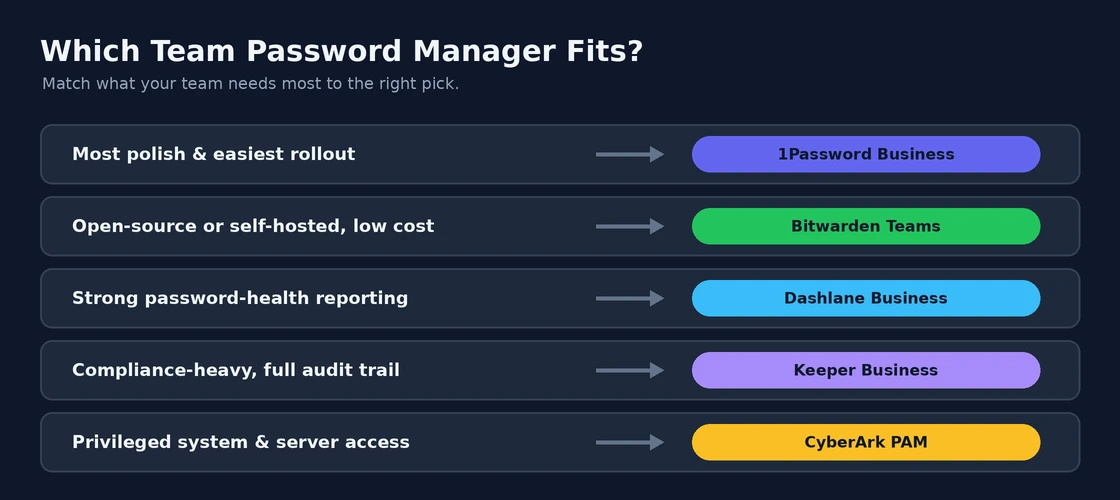
The quick picks by team size and needs: 1Password Business for most companies up to a few hundred employees (best polish, best mobile, decent admin controls). Bitwarden Teams if you want the best value or want self-hostable open-source software. Dashlane Business for businesses prioritising password health reporting. Keeper Business for compliance-heavy industries. Enterprise password vaults (CyberArk, BeyondTrust) only for organisations with specific privileged access management requirements.
The detailed comparison below covers each by use case, pricing per user, and where each falls short. For most small-to-medium teams the choice is between 1Password and Bitwarden — the others address specific niches.
Best Password Sharing Software for Teams: 1Password Teams
1Password Teams (from £7.99/user/month; 1password.com) is the team password manager I recommend most confidently — the vault structure, the granular permission model, and the security architecture are the best combination available. Team vaults allow organising credentials by department, project, or access level — the marketing team has access to social media and marketing tool credentials, the engineering team has access to infrastructure and code repository credentials, and only admins see the master vault. Credentials shared to a vault are accessible to all vault members but individual members do not see the underlying password — they use it through 1Password’s browser extension without it being visible, which prevents credentials from being copied and shared outside the vault system. The admin controls — seeing which team members have access to which credentials, revoking access instantly when someone leaves, seeing when credentials were last used and by whom — provide the audit trail and access control that email-shared passwords cannot. The Travel Mode feature (removing specific vaults from devices when crossing borders) is available for teams alongside individuals. The security architecture has been independently audited and the results published. For teams where credential security is taken seriously, 1Password Teams is the strongest available option.Best Password Sharing Software for Teams: Bitwarden Business
Bitwarden Business (Teams plan from £3/user/month; bitwarden.com) is the open-source alternative to 1Password Teams — comparable vault structure, granular permissions, audit logging, and admin controls at a significantly lower per-user cost. The open-source codebase means the security implementation is publicly auditable rather than requiring trust in vendor claims. The self-hosting option — running Bitwarden on your own infrastructure rather than Bitwarden’s servers — is available for organisations with data sovereignty requirements that prohibit using third-party cloud services for credential storage. The Bitwarden Business interface is slightly less polished than 1Password’s but the security capabilities are comparable. For budget-conscious teams where security is the priority and cost matters, Bitwarden Business delivers the security features of 1Password at roughly 40% of the price. For teams where ease of use and polish matter more than cost, 1Password’s more refined interface is worth the premium.Best Password Sharing Software for Teams: Dashlane Business
Dashlane Business (from £4.99/user/month; dashlane.com) adds dark web monitoring at the organisational level — scanning breach databases for any company email addresses or domains that have appeared in known data breaches and alerting the admin. For organisations where credential breach monitoring matters alongside secure sharing, Dashlane’s dark web monitoring at the business tier adds a detection layer that 1Password and Bitwarden do not include. The sharing and permission model is solid, and the admin console provides good visibility into credential health across the organisation.Best Password Sharing Software for Teams: Keeper Business
Keeper Business (from £3.75/user/month; keepersecurity.com) is the team password manager with the strongest enterprise compliance credentials — SOC 2 Type 2, ISO 27001, FedRAMP (US government-approved), HIPAA compliance for healthcare organisations, and GDPR compliance documentation. For organisations in regulated industries where compliance certification of security tools is a procurement requirement, Keeper’s compliance portfolio is the most comprehensive of the options in this guide. The features — vault management, granular permissions, admin controls, audit logging — are comparable to 1Password and Bitwarden.Migrating from Shared Spreadsheets
The most common starting point for teams adopting password sharing software is migrating from a shared spreadsheet of credentials. Every tool in this guide supports CSV import, which makes migration straightforward: export the spreadsheet as CSV, import into the password manager, verify the credentials are correct, then delete the spreadsheet from all accessible locations (including email attachments and backup copies). The import-and-verify step is important — CSV imports occasionally misalign fields, and catching errors before deleting the spreadsheet prevents lockouts.| Tool | Cost | Open Source? | Best For |
|---|---|---|---|
| 1Password Teams | £7.99/user/month | No | Best overall; most polished; strongest security architecture |
| Bitwarden Business | £3/user/month | Yes | Best value; open source; self-hosting option |
| Dashlane Business | £4.99/user/month | No | Dark web monitoring for credential breach detection |
| Keeper Business | £3.75/user/month | No | Regulated industries; compliance certifications |
1Password Business
1Password Business is the most-recommended team password manager for small to medium organisations. The interface is polished, mobile apps are excellent, and the admin controls are sufficient without being overwhelming.
Pricing: $7.99/user/month for Business tier. Teams Starter is $19.95/month for up to 10 users (flat rate, often cheaper for small teams).
Strengths: Best-in-class polish, excellent mobile and browser apps, Vault structure for organising shared credentials by team or project, Watchtower flags weak/breached passwords, Travel Mode for crossing borders securely.
Weaknesses: More expensive than Bitwarden, can’t self-host, occasional reports of family plan and business plan conflicts on personal accounts.
Bitwarden Teams
Bitwarden is open-source and offers both cloud-hosted and self-hosted deployment options. The cloud version is significantly cheaper than 1Password; the self-hosted version is free if you have the technical capability to run it.
Pricing: Teams cloud at $4/user/month (substantially cheaper than competitors). Self-hosted is free.
Strengths: Open-source (you can audit the code), self-hosting option for organisations with strict data residency requirements, significantly cheaper than competitors, all features available regardless of plan tier.
Weaknesses: Mobile and desktop apps less polished than 1Password, password sharing UX requires more steps, browser extension occasionally less reliable.
Dashlane Business
Dashlane positions itself as the password manager with the best dark web monitoring and password health reporting. The features genuinely are useful for security-conscious organisations — admins get reports showing which employees use weak or reused passwords.
Pricing: $8/user/month for Business tier. Standard Business plan includes admin console and SSO.
Strengths: Excellent password health scoring and reporting, integrated VPN at higher tiers, good dark web monitoring, password changer automates rotating compromised passwords.
Weaknesses: Premium pricing, recent UI changes have been controversial, no free tier comparable to Bitwarden.
Keeper Business
Keeper targets compliance-heavy industries (healthcare, finance, government) with FedRAMP certification, HIPAA compliance documentation, and detailed audit logs. For organisations needing to demonstrate password management compliance to auditors, Keeper has documentation the others don’t.
Pricing: $3.75/user/month for Business tier, additional cost for add-ons like dark web monitoring or secure messaging.
Strengths: Strong compliance certifications, detailed audit logs, secure file storage included, good admin role-based permissions.
Weaknesses: UI less polished than 1Password or Dashlane, some features are paid add-ons rather than included, lock-in to Keeper-specific format.
CyberArk and Enterprise PAM tools — only when needed
Enterprise Privileged Access Management tools like CyberArk, BeyondTrust, and Delinea are not direct competitors to the password managers above. They manage administrative credentials — root passwords, database admins, network device passwords — with features like session recording, just-in-time access, and credential rotation. Costs are 10-100x what consumer-business password managers charge.
When to use: Only organisations with specific privileged access requirements (financial services regulations, government systems, large enterprise IT). Most companies don’t need PAM tools and shouldn’t pay for them.
Is 1Password worth the cost over Bitwarden?
For most teams: yes, modestly. 1Password’s polish, mobile experience, and admin tools save real time over months. Bitwarden costs roughly half as much per user and is open-source — significant for budget-conscious teams or organisations that audit their software. The choice often comes down to whether you’d prefer to pay for better UX or save money with slightly less polish.
Can I self-host a team password manager?
Bitwarden has full self-hosting support (the same software they run as a service is available open source). Vaultwarden is a lighter-weight Bitwarden-compatible server for smaller teams. 1Password, Dashlane, and Keeper do not support self-hosting — they’re cloud-only. Self-hosting is genuinely useful only for organisations with data residency or regulatory requirements; for most teams the security benefit is theoretical.
How do I get my team to actually use a password manager?
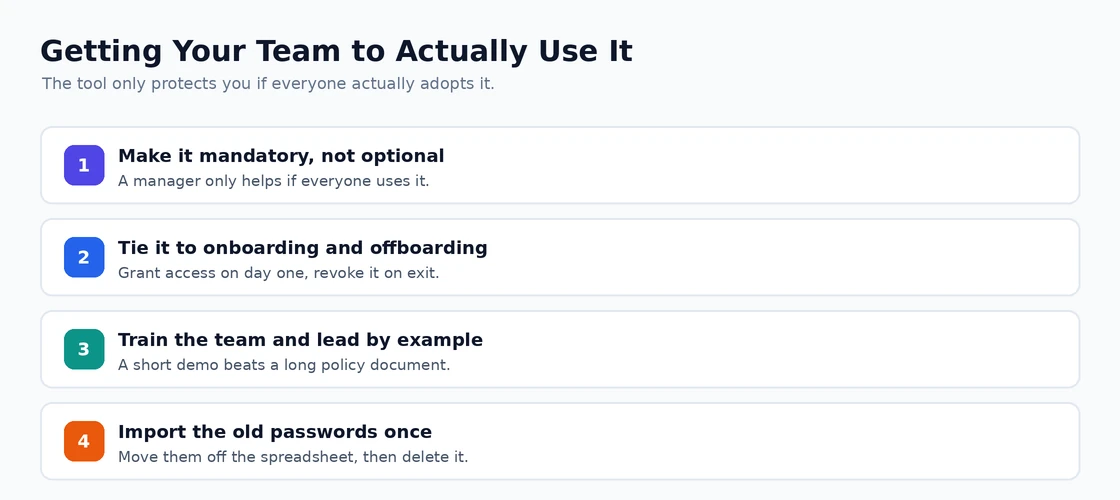
Three things matter most: (1) make it mandatory rather than optional — if individuals can opt out, most will; (2) seed it with the credentials they actually use day-to-day rather than waiting for organic adoption; (3) train them on the browser extension specifically — that’s where 90% of value is delivered and most people don’t discover the full capability without being shown.
What happens if an employee leaves and they had access to shared passwords?
This is where team password managers earn their cost over informal sharing. Admin disables the account; access to shared vaults revokes immediately. The shared credentials are then ideally rotated (changed at the actual service — Slack, AWS, etc.) since the employee saw them. Pre-rotation, they could still know the password even after access is revoked. All the team tools listed support this workflow; the manual sharing methods (email, Slack) do not.
Is sharing passwords through Slack or email actually that bad?
Yes, because credentials persist in those systems indefinitely and are searchable. An ex-employee with Slack access can search for shared passwords months after they were sent. A compromised email account exposes every password ever shared. Both also bypass any audit trail — there’s no record of who accessed what. Genuine cost difference between $4/user/month and ‘free’ (which actually costs you a security breach eventually) is small relative to the risk.
Do team password managers support 2FA codes (TOTP)?
Yes, most modern team password managers store and auto-fill TOTP codes alongside passwords. 1Password, Bitwarden, Dashlane, and Keeper all support this. Some security professionals argue this defeats the purpose of 2FA (single point of compromise) — others note that a strong password manager with secured master password is more secure than weak passwords with TOTP. Decide based on your threat model. If this sounds familiar, Best NAS Software is worth a look.