The right parental control software depends almost entirely on the age of your child, because what young children need is fundamentally different from what teenagers need, and applying a one-size-fits-all approach produces both over-restriction for older children and under-protection for younger ones. Three developmental stages cover most situations. Young children aged roughly five to nine need broad content filtering and screen time limits because they cannot yet evaluate what they encounter online and have not yet developed the impulse control to manage their own use. Pre-teens aged ten to thirteen need different tools because they are starting to navigate social platforms, want some independence, and are learning to make their own decisions about content. Teens aged fourteen to seventeen need different approaches again because heavy-handed restriction often produces resistance and workarounds rather than safety; the tools that work are typically about transparency and conversation rather than blocking.
This matters because parental control software optimised for one stage is often actively counterproductive for another. The locked-down approach that protects a seven-year-old produces evasion behaviours and damaged trust in a fifteen-year-old. The transparent monitoring that supports parent-teen conversations would be more invasive than necessary for a young child. Picking the wrong category of tool for your child’s stage produces outcomes worse than no tool at all.
This guide is structured around developmental stages because the recommendations genuinely differ. For broader context on the family-and-security software stack, our guide to the best software and apps covers the adjacent categories.
For Young Children (Ages 5-9): Microsoft Family Safety or Google Family Link
For young children using shared family devices or their own tablets, the right tools provide broad content filtering, time limits, and visibility into what they are doing without requiring sophisticated configuration. The platform-native tools handle this case adequately and at no additional cost.
Microsoft Family Safety (free; included with Microsoft accounts; familysafety.microsoft.com) is the right answer for children using Windows PCs and Xbox consoles. The product provides screen time limits across all family devices that synchronise, content filtering for web browsing through Microsoft Edge, application and game restrictions based on age ratings, and activity reports showing what the child has been doing. The integration with Microsoft accounts means the same settings apply across the child’s PC, Xbox, and Android phone (if they use one).
The case for Family Safety specifically at this age is the operational simplicity and zero cost. The setup is straightforward through the Family Safety app or the Microsoft account web interface. The defaults are reasonable for young children, and adjusting them rarely requires technical depth. The reporting gives parents visibility without requiring active monitoring during normal use.
Google Family Link (free; families.google) is the equivalent for Android-using households or families with iPhones using Google services. The capability is similar to Family Safety — screen time limits, content restrictions, app approvals, location sharing. The case for Family Link is when your family is in the Google ecosystem rather than the Microsoft ecosystem, or when your child’s primary device is an Android phone or tablet.
For Apple-ecosystem families, Screen Time (built into iOS, iPadOS, and macOS) provides similar capabilities with native integration across Apple devices. The Family Sharing setup that pairs with Screen Time produces appropriate controls for children’s Apple devices managed by parents.
The realistic guidance at this age is to use whichever platform tool matches your family’s ecosystem rather than installing third-party software. The platform tools work adequately, cost nothing, and avoid introducing additional software into a child’s environment that has its own potential issues.

For Pre-Teens (Ages 10-13): Qustodio or Bark
The pre-teen years are where platform-native tools start to feel inadequate and where dedicated parental control software produces meaningful value. Pre-teens are starting to use social platforms, communicate with friends online, encounter content that requires more nuanced filtering than simple age ratings, and develop the technical sophistication to work around basic restrictions.
Qustodio (qustodio.com; free for one device with limits, paid plans from $54.95/year for 5 devices, up to $137.95/year for 15 devices) is the right parental control software for pre-teens whose digital life is becoming more complex. The product handles the realistic needs of this age group — comprehensive content filtering that goes beyond simple category blocking, social media monitoring with appropriate visibility, location tracking that matters at this age, application time limits, and reporting that supports conversations with the child about their digital life.
The case for Qustodio specifically is the breadth of platform coverage. The product works across Windows, macOS, iOS, Android, Chromebook, and Kindle, which matches the realistic device situation of pre-teens who increasingly use multiple devices. The reporting consolidates across devices, which produces visibility that single-platform tools cannot match for children with diverse device use.
The strengths beyond the platform coverage are real. The category-based filtering handles the realistic content concerns at this age (violence, sexual content, gambling) with appropriate granularity. The social media monitoring (where supported) provides visibility into the platforms where pre-teens are increasingly active. The screen time controls handle both total time and per-application time.
Bark (bark.us; from $14/month for the Premium tier covering unlimited devices) takes a meaningfully different approach focused on monitoring rather than blocking. Rather than restricting what children can access, Bark watches communications and online activity for signs of specific concerns — cyberbullying, sexual content, signs of depression or suicidal ideation, drug references, predatory contact patterns. The product alerts parents when concerning patterns appear rather than blocking access broadly.
The case for Bark specifically is when your parenting approach prioritises conversation over restriction. For pre-teens at the older end of this range, who are starting to need privacy and trust development, Bark’s monitoring-with-alerts approach can support parent-child conversations about specific concerns rather than imposing broad restrictions. The case against is that the monitoring requires the child to know they are being monitored for the trust dynamic to work, which some parents find awkward to navigate.
The choice between Qustodio and Bark at this age depends on parenting philosophy. Restrictive-with-monitoring matches Qustodio; transparent-monitoring-with-conversations matches Bark. Both produce value for the pre-teen stage when matched to family dynamics.
For Teenagers (Ages 14-17): Transparent Monitoring or Conversation-First Approaches
The teenage years require a fundamentally different approach because heavy-handed restriction reliably produces resistance, workarounds, and damaged trust rather than safety. Teenagers are developing autonomy, making decisions about their own lives, and need parental guidance rather than parental control. The tools that work for this age group are typically about supporting parent-teen conversations rather than imposing restrictions.
Bark continues to be valuable for teenagers with the appropriate framing. Used transparently with teenagers who know about and have agreed to the monitoring as part of mutual trust agreements, Bark’s approach of “alerting parents to specific concerns” produces conversations that protect teens better than restriction would. Used covertly without teen awareness, Bark produces resentment when discovered and damages the trust it was supposed to protect.
The conversation-first approach acknowledges that by the teenage years, parents have largely lost the ability to technically control their teens’ internet access. Teens have phones, friends’ devices, school computers, and the technical sophistication to circumvent most restrictions. The realistic protection comes from teens having internalised values about appropriate online behaviour, knowing they can come to parents with problems, and developing their own judgement about online situations.
Tools that support this approach focus on shared visibility rather than parent-only monitoring. Family location sharing (Apple Find My, Google Family Link location features) that works in both directions — parents can see teens, teens can see parents — supports practical coordination without feeling like surveillance. Time-aware controls that automatically relax restrictions as teens age treat the natural progression of autonomy as the default rather than as a fight.
For very specific concerns at this age, targeted tools may still be appropriate. Teen-focused mental health monitoring (the suicide-and-depression-related alerting that Bark provides), problematic social media usage tools that the teen specifically wants help with, or specific website blocking that the teen agrees to as part of self-imposed structure all produce value in specific contexts.
The honest framing is that by the teenage years, the relevant tools are usually less about controlling the teen and more about supporting the parent-teen relationship. Parental control software that addresses this reframing is genuinely useful; software that tries to impose pre-teen-level restriction on teens produces predictable failures regardless of which product is chosen. Our VPN comparison covers a related category where parents sometimes discover their teens have been using VPNs to circumvent network-level parental controls — the discovery is usually an indicator that the approach needs to shift rather than that the controls need to be stricter.
Network-Level Filtering: OpenDNS and Similar
One specific approach that complements device-level parental control software is network-level filtering through DNS-based services. These services operate at the router level affecting all devices on your home network rather than requiring software installation on each device.
OpenDNS Family Shield (free; opendns.com) is the established free option for network-level family filtering. The setup involves changing your router’s DNS settings to OpenDNS’s family-filtering servers, which then automatically block adult content and known malicious sites for any device using your home network. The protection covers smart TVs, gaming consoles, guest devices, and other endpoints that device-level tools cannot easily install on.
The case for network-level filtering specifically is when you want broad protection across many devices and household members without the per-device configuration overhead. For households with many connected devices, configuring parental controls on each one is impractical; network-level filtering provides baseline coverage with minimal configuration.
The realistic limits are about granularity and bypass. Network filtering applies the same rules to everyone on the network, which is fine for blanket protection but does not differentiate between family members. Children’s phones using mobile data rather than home wifi bypass the filtering entirely. Sophisticated users can change DNS settings on their devices to bypass the network-level controls.
The honest recommendation is that network-level filtering works as a complement to device-level tools rather than a replacement. For broad baseline protection across many devices, network-level filtering adds value at minimal cost; for granular control with age-appropriate differentiation, device-level tools remain necessary. Our ad blocker comparison covers the related category that overlaps with network-level filtering for users wanting broader content protection.
Circle: The Hardware-Based Approach
Circle (formerly Circle with Disney, now Circle Home Plus; circle.com; from $79.99 hardware purchase plus optional subscription) takes a hardware-based approach by connecting a small device to your home router that manages parental controls for all devices on your network. The product allows per-device and per-family-member configuration that pure network-level filtering does not.
The case for Circle specifically is when you want sophisticated parental controls across all home network devices including ones where software cannot be installed. The hardware approach handles the differentiation problem of network-level filtering (different rules for different family members) while extending to devices that device-level software cannot reach.
The realistic concerns are the hardware purchase cost and the subscription model for ongoing protection updates. The initial investment is meaningful, and the subscription for ongoing features adds up over years of use. For families specifically benefiting from the hardware approach, the cost is justified; for families where simpler tools cover the needs, Circle is more product than required.
For most families, the platform-native tools (Family Safety, Family Link, Screen Time) handle the realistic needs without hardware purchases. Circle is the right pick for specific cases where its capability is genuinely needed.
The Specific Concerns Worth Addressing With Specific Tools
Beyond the age-based framing, several specific concerns affect tool choice for particular situations.

Screen time addiction concerns. The platform-native tools handle time-based limits adequately. The realistic challenge is the parent-child negotiation about what limits are appropriate rather than the technical implementation. For children with diagnosed attention or addiction concerns, the conversation with paediatric or family therapists matters more than the specific tool.
Social media safety specifically. Bark and similar monitoring tools provide the most visibility into social media specifically. The platforms themselves are also adding their own teen-protection features (Instagram’s teen account restrictions, TikTok’s family pairing) that complement rather than replace parental control tools.
Online predator concerns. The relevant tools include Bark (which alerts on predatory contact patterns), open conversations about appropriate online relationships, and the platform-level protections that have improved substantially in recent years. The most important protection is teaching children what predatory patterns look like and creating an environment where they will come to parents with concerns.
Inappropriate content exposure. Network-level filtering plus device-level filtering provides layered protection. The honest framing is that no filter is perfect, and children will encounter inappropriate content occasionally. Preparing children to know what to do when they encounter such content (close it, tell a parent, do not interact) matters more than perfect filtering.
Cyberbullying. Bark monitors for cyberbullying patterns specifically. The other relevant tools are about supporting the parent-child relationship so children come to parents with bullying experiences rather than dealing with them alone. The technical tools are secondary to the relational dynamics. Our password manager comparison covers a related security topic that often becomes relevant when discussing online safety with children.
The Privacy and Trust Considerations
One framing point worth making explicitly: parental control software involves monitoring children’s online activity, which has privacy implications even when the children are minors and the monitoring is appropriate. How parents handle this monitoring affects both immediate effectiveness and the long-term parent-child relationship.
For young children, the monitoring is largely about safety rather than surveillance, and children at this age accept reasonable supervision as normal. The privacy concerns are minimal at this stage.
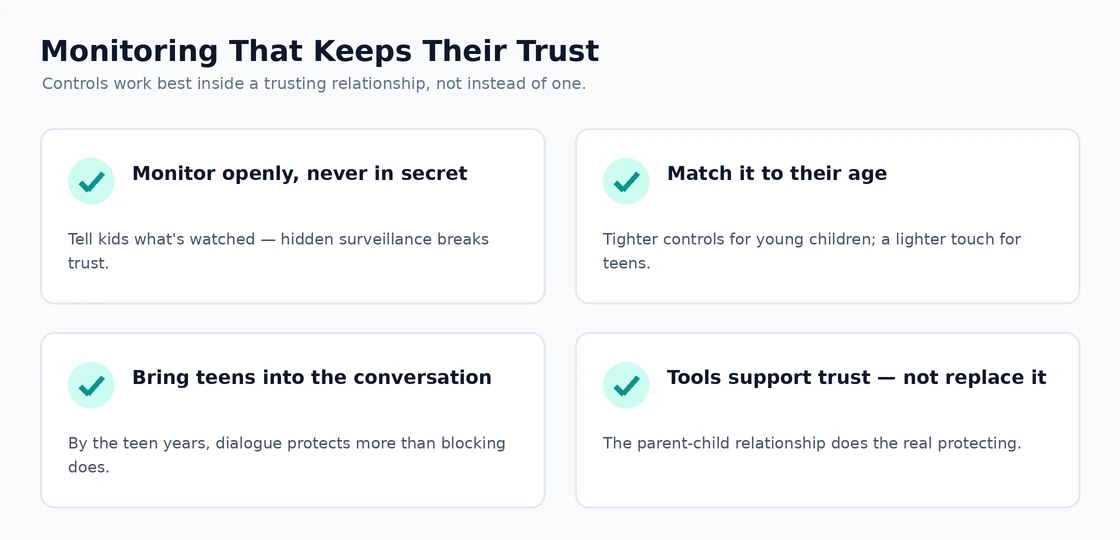
For pre-teens and teens, transparency about monitoring is essential. Hidden monitoring that children later discover produces the worst outcomes — children feel betrayed by parents they thought they could trust, evidence that parents are watching makes children less likely to come to parents with problems, and the long-term relationship damage often exceeds whatever short-term protection the monitoring provided. Telling children “we use [tool] to know what you are doing online, here is why, here is what we will and will not act on” produces dramatically better outcomes than covert monitoring.
The realistic framing for teens specifically is that the monitoring should support conversations rather than replace them. Tools that alert parents to specific concerning situations let parents have informed conversations with their teens about those situations; tools that produce comprehensive surveillance create relationships where teens feel constantly watched and have nothing private to themselves. The former supports development; the latter often damages it.
For families where the parent-child relationship is already strained, parental control software is usually addressing symptoms rather than causes. The realistic protection in those families comes from repairing the relationship dynamics rather than escalating the monitoring. Our Mac antivirus comparison covers a related category where similar considerations apply about layered protection that includes both technical tools and behavioural patterns.
The Practical Recommendation
For most families in 2026, the answer follows directly from the age of the children involved. Young children (5-9): platform-native tools (Microsoft Family Safety, Google Family Link, Apple Screen Time) provide adequate protection at zero cost, supplemented by network-level filtering through OpenDNS Family Shield. Pre-teens (10-13): Qustodio for restrictive-plus-monitoring approach or Bark for monitoring-and-alerting approach, depending on family parenting philosophy. Teenagers (14-17): Bark with full transparency about the monitoring, supported by ongoing conversations about online safety, with the recognition that technical controls have diminishing effectiveness as teens age. Specific concerns (social media safety, cyberbullying, mental health monitoring) addressed by tools targeted to those concerns alongside the age-appropriate baseline. The wrong move is applying the same approach across all ages, because young children need different tools than teenagers and applying either to the wrong age produces predictable failures. Match the tool to the developmental stage, prioritise the parent-child relationship over technical control, and the category produces meaningful safety improvements rather than ongoing family conflict.