Most users searching for audio editing software actually need recording-with-editing rather than pure audio editing. The distinction matters because the tools optimised for each are genuinely different, and picking based on a confused understanding of what you actually need produces poor outcomes. Pure audio editing is what you do when you have audio files that already exist and you need to modify them — cleaning up recordings someone else made, repairing a problematic recording, processing audio for specific output requirements. Recording-with-editing is what you do when the recording is part of the workflow — capturing a podcast, recording voiceover, producing music, where the editing happens immediately after the recording you just made.
The implications matter for tool choice. Pure editing tools optimise for audio analysis and processing without strong emphasis on the recording interface. Recording-with-editing tools optimise for the combined workflow where you record, edit, and export as one fluid process. Software that is excellent for one is often awkward for the other, and users who pick the wrong category for their actual need end up working around the mismatch rather than benefiting from the tool’s strengths.
This guide handles both categories with honest distinction between them. For broader context on the audio and media production software stack, our guide to the best software and apps covers the adjacent categories.
For Recording-Plus-Editing Workflows: Audacity
Audacity (free, open-source; audacityteam.org) is the audio editing software for users whose workflow is “record something and then edit what I just recorded” rather than pure editing of existing files. The product handles the integrated workflow well — start recording with one button, stop recording, immediately edit the recording, export to the final format, all in one tool without switching applications.
The case for Audacity specifically for this workflow is the combination of capability and price. The tool handles podcast recording, voiceover work, audio for video projects, and music recording at a level adequate for most realistic use cases. The free pricing means you can start using it without committing budget to discover whether it fits your needs. The cross-platform support (Windows, Mac, Linux) means the same workflow works regardless of which computer you are using.
The strengths for recording-plus-editing are real. Multi-track support lets you handle multiple microphones or layered audio (host plus guest, voice plus background music, dialogue plus sound effects) on separate tracks that can be edited independently. The editing tools handle the realistic tasks for spoken-word content — removing pauses, cutting mistakes, trimming silence at the beginning and end, applying noise reduction to clean up the audio. The plugin ecosystem extends functionality further for users with specific needs.
The honest concerns with Audacity are about the interface and the audio engineering exposure. The interface follows traditional audio editing conventions that show the underlying technical concepts (sample rates, bit depths, signal levels) rather than hiding them behind friendlier defaults. New users sometimes struggle with concepts that more polished commercial tools obscure. The visual design feels dated compared to newer products.
For users whose recording-plus-editing workflow is podcasting, voiceover, basic music production, or audio-for-video work, Audacity is the right starting tool. Many users graduate to more capable software as their production sophistication grows; many others stay on Audacity for years because it does what they need. The case for paying for alternatives is concentrated in users with specific needs that Audacity does not handle well.
For Professional Audio Editing of Existing Files: Adobe Audition
Adobe Audition (adobe.com/audition; Single App plan at $22.99/month, or included with Creative Cloud All Apps) is the audio editing software for professional-grade editing of existing audio files. The product’s positioning is genuinely “pure audio editing” rather than “recording with editing tools added” — the strengths reflect this focus.
The case for Audition specifically is in the audio processing depth that other tools cannot match. The noise reduction algorithms handle problematic source audio (echoey rooms, background noise, frequency-specific interference) better than the alternatives. The spectral editing capability lets you visualise audio as a spectrogram and remove specific sounds surgically — clicking on a representation of a door slam, an unwanted breath, or a phone notification and removing it without affecting surrounding audio. The healing brush for audio fixes problems that pure waveform editing cannot address well.
The integration with the rest of Adobe Creative Cloud matters substantially for users working on broader video and design projects. Audio captured in Premiere Pro can be sent to Audition for detailed editing and returned with the timeline preserved. The Multi-track session model handles complex production work with many concurrent sources.
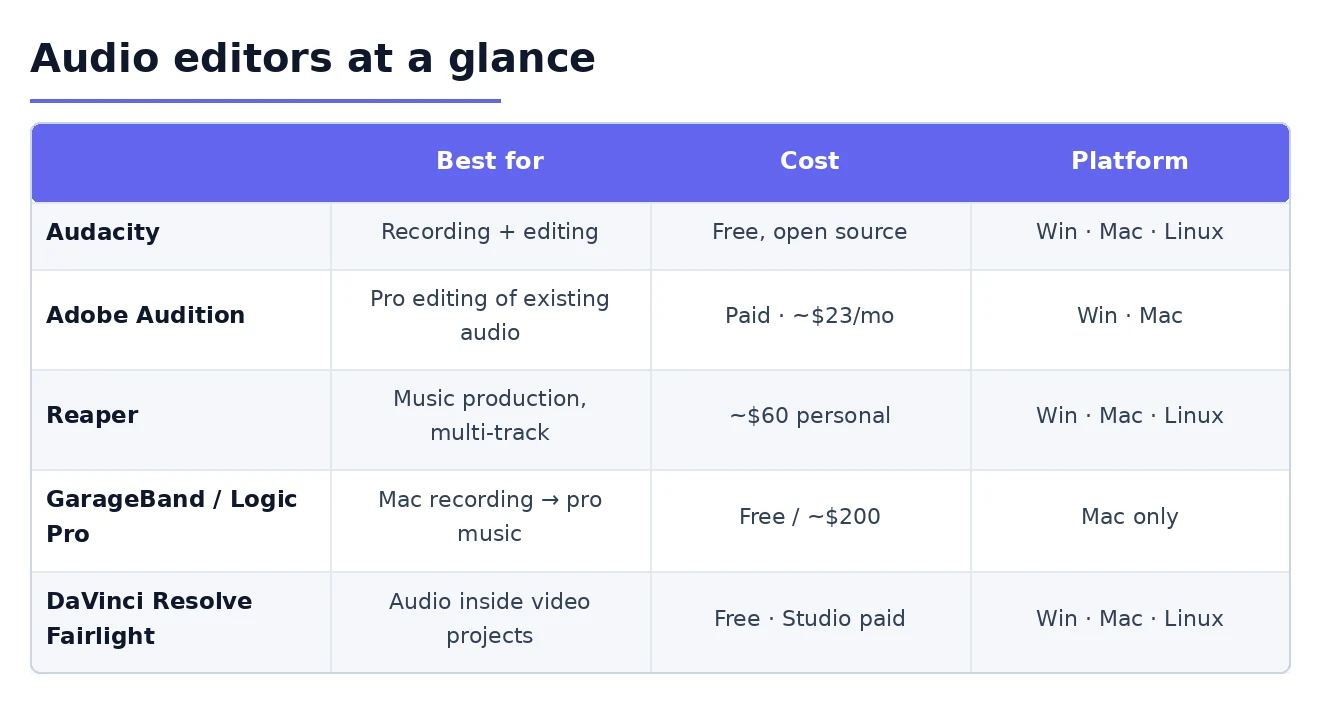
The case against Audition for most users is the same as for any premium Adobe product. The subscription cost is substantial — $22.99/month for Audition alone or $63.99/month for Creative Cloud All Apps — and the value justification depends on whether audio production is genuinely the work you are paid for. For users editing the occasional podcast episode or producing voice content as a small part of broader work, the cost is not justified by the marginal capability over Audacity.
For professionals where audio quality directly affects business outcomes — voiceover artists, audio engineers, podcast producers running businesses on their podcasts, professional musicians — Audition’s processing depth is genuinely valuable. For other users, the alternatives produce adequate results at meaningfully lower cost.
For Music Production and Multi-Track Audio: Reaper
Reaper (60-day evaluation, $60 discounted commercial license, $225 full commercial; reaper.fm) is the audio editing software for users whose work involves music production, multi-track recording with many simultaneous sources, or complex audio production for video. The product is a genuine digital audio workstation (DAW) with capability comparable to expensive professional alternatives at a fraction of the cost.
The case for Reaper specifically is the combination of professional DAW capability and friendly pricing. The product handles unlimited tracks, comprehensive MIDI sequencing for music production, the full VST plugin ecosystem, sophisticated mixing console functionality, automation of all parameters, and video integration for users working on audio for video projects. The customisation depth is genuinely impressive — Reaper can be configured to match almost any workflow preference.
The realistic friction is the learning curve. Reaper expects audio engineering knowledge that Audacity hides and that more user-friendly DAWs (GarageBand, Logic) progressively introduce. For users without that background, the upfront learning is substantial. The interface, while customisable, defaults to a layout that experienced users appreciate and new users sometimes find overwhelming.
The case for paying for Reaper specifically over Audacity is when your work genuinely justifies a DAW rather than a simpler editor. Multiple microphone tracks for podcast production, music with virtual instruments and MIDI sequencing, audio for video with multiple audio sources, voiceover work with sophisticated mixing requirements — all of these benefit from Reaper’s depth. For straightforward podcast editing where Audacity handles the work, Reaper’s additional capability is unused complexity.
For Mac Users: GarageBand and Logic Pro
For users specifically on macOS, the Apple-provided audio tools deserve separate treatment because they are genuinely competitive options that Windows users do not have access to.
GarageBand (free with macOS) is the entry-level audio production tool that ships with every Mac. The product handles music recording, podcast production, basic audio editing, and voiceover work at a level that exceeds what many users expect from “free software included with the OS.” For Mac users entering audio production, GarageBand is the natural starting point before considering paid alternatives.
Logic Pro ($199.99 one-time, no subscription) is Apple’s professional audio production software that builds on the GarageBand foundation with capability that competes with Pro Tools and Ableton Live. The one-time pricing is dramatically cheaper than subscription alternatives, and the product is genuinely professional-grade. For Mac users producing music, podcasts, or other serious audio content, Logic Pro is the strong choice at exceptional value compared to subscription alternatives.
The case for these Apple tools is concentrated in Mac users specifically. For Windows users, the equivalent capability requires either GarageBand-substitutes (which do not exist with the same combination of capability and free pricing) or paid alternatives. For Mac users committed to the platform, the Apple audio production path is genuinely excellent and meaningfully cheaper than the cross-platform alternatives.
One specific consideration: Logic Pro project files are not compatible with non-Apple software. Users who might work with collaborators on Windows or who might need to share project files across platforms should consider whether the Apple-ecosystem lock-in matters for their use case. For solo work or all-Mac teams, this is irrelevant; for cross-platform collaboration, the format compatibility favours cross-platform tools.
For Video Production With Audio: DaVinci Resolve Fairlight
DaVinci Resolve (free with optional paid Studio version at $295 one-time; blackmagicdesign.com/products/davinciresolve) is the video editing software that includes a full audio production module called Fairlight. For users whose audio work is genuinely part of video production rather than standalone audio, DaVinci Resolve handles both in one tool with capability that exceeds many users’ expectations.

The case for DaVinci Resolve specifically for audio work is when video production is your primary work and audio is part of that workflow. Recording voiceover for video, editing dialog for video projects, mixing audio for video output — all of these happen in one application without switching between video and audio tools. The Fairlight module includes proper multi-track audio recording, sophisticated editing tools, professional mixing capability, and the audio post-production features that high-end video work needs.
The free version of DaVinci Resolve includes most of the audio functionality that users need; the paid Studio version adds specific advanced features that mostly matter at the professional production level. The free pricing is genuinely substantial — what would cost hundreds or thousands in alternative tools is available free in DaVinci Resolve.
The case against for pure audio work is that DaVinci Resolve is fundamentally a video application with audio features rather than the reverse. Users whose work is purely audio will find the video-centric interface produces friction without benefit. For audio-only work, the dedicated audio tools above serve better. Our video editing software comparison covers DaVinci Resolve and alternatives in their primary capacity as video editors.
For Quick One-Off Audio Tasks: Online Tools
One category worth mentioning for completeness: web-based audio editors that handle simple one-off tasks without installing software. Tools like AudioMass (free, web-based) or Soundtrap (free with paid tiers) handle straightforward audio editing through a browser interface for the realistic case of “I just need to trim this audio file” or “I need to convert this format quickly.”
The case for online tools specifically is when you need to do simple audio work occasionally and the installation overhead of a dedicated tool is not justified by the frequency of use. For users who edit audio once a month or less, online tools handle the realistic case without requiring software installation, account creation for paid services, or commitment to a specific tool.
The case against online tools for substantial work is the realistic limits. Browser-based audio processing is slower than native applications, the file size limits are real, and the audio quality through web upload-process-download cycles can suffer subtle degradation. For occasional use, none of this matters; for substantial work, the limitations become friction.
For users whose audio work is genuinely occasional, having an online tool bookmarked is more appropriate than installing dedicated software. For users with regular audio needs, the dedicated tools above are the better long-term investment.
The Specialised Categories Worth Knowing About
Several specialist audio editing tools serve narrow use cases that the general-purpose tools handle less well.
iZotope RX is the dominant tool for audio restoration — repairing problematic recordings, removing specific artefacts, restoring degraded archival audio. For users whose work specifically involves rescuing bad recordings (forensic audio work, restoring old recordings, professional production with challenging source material), RX is the right specialist tool with essentially no competition at the high end.
Descript takes a different approach by letting you edit audio through editing its transcribed text. Delete a word from the transcript and the corresponding audio is removed. For podcast editing specifically, this text-based editing workflow can be dramatically faster than traditional waveform editing for many tasks. The pricing (paid plans from $12/month annually; descript.com) is reasonable for the workflow it enables. Our voice recording software comparison covers Descript in more depth.
Ardour is the open-source DAW alternative to Reaper for users who specifically want open-source software. The capability is genuinely substantial and the pricing model (pay what you want, with $1 minimum) is friendly to users without budget. The case for Ardour over Reaper is concentrated in users who specifically value the open-source positioning.
For specifically podcast-focused workflows, dedicated podcast production tools like Hindenburg Pro and Squadcast offer features tuned specifically for podcast production (loudness normalisation matching podcast platform standards, multi-track recording for remote guest interviews, dialogue-specific editing tools). For podcasters specifically, these tools sometimes serve better than general audio editors. Our podcast app comparison covers the related category in depth.

The Plugin Ecosystem Consideration
One framing point that affects long-term satisfaction: audio editing software lives in a broader ecosystem of plugins that extend functionality. Effects, instruments, processors, and analysis tools come from many third parties in standard formats (VST, AU, AAX) that work across multiple host applications.
The implications for tool choice are real. Audacity supports VST plugins but has historically had compatibility issues with some plugins. Audition has strong plugin support but tied to the Adobe ecosystem. Reaper has excellent plugin support and is known for being friendly to unusual plugin configurations. The free or low-cost plugins available in 2026 are genuinely substantial — quality processing that would have cost hundreds of dollars a decade ago is often free or inexpensive now.
For users who anticipate substantial plugin use, picking software with strong plugin support matters. For users whose work is straightforward editing without extensive processing, plugin support is less central. The decision affects what users can grow into rather than what they need on day one.
The Hardware and Environment Considerations
One framing point worth making about audio editing broadly: the software you choose matters less than the audio quality you start with. Editing tools can clean up problematic audio, but they cannot create quality that was not captured. A great recording in mediocre software produces better results than a mediocre recording in great software.
The realistic priorities for audio quality: investment in microphone first, recording environment second, software third. A $100 USB microphone in a closet full of clothes produces audio dramatically better than a laptop microphone in a typical office, regardless of which software processes the result. The hour spent setting up a decent recording environment produces more audio quality improvement than years of software optimisation.
For users whose audio editing work involves recordings they captured themselves, evaluating the source quality and improving it where possible matters substantially. For users whose work is editing audio captured by others, the source quality is given, and the editing tool choice matters more for the cleanup possibilities the tool provides. Our transcription software comparison covers the related category for users whose audio work is primarily transcription-focused.
The Practical Recommendation
For most users in 2026, the answer follows from whether you are recording-plus-editing or pure editing. Recording-plus-editing for podcasts, voiceover, basic music, or audio-for-video: Audacity as the free default. Pure professional editing of existing files for paid audio work: Adobe Audition for the processing depth. Music production or sophisticated multi-track recording: Reaper for the DAW capability at modest cost. Mac users entering audio production: GarageBand for free, upgrading to Logic Pro when needs grow. Video producers who include audio work in their broader workflow: DaVinci Resolve with the Fairlight module handles both. Occasional one-off audio tasks without software installation: web-based tools like AudioMass. Audio restoration specifically: iZotope RX. The wrong move is picking by general reputation without first identifying whether you are recording-plus-editing or pure editing, because the same tool that excels at one is often awkward for the other. Match the tool to your actual workflow, invest in microphone and environment for the source quality that no software can recover from poor sources, and the category produces output you are proud of rather than ongoing frustration with technical limitations.