
Internet providers love to sell you speed. Every advertisement pushes a bigger number of megabits, a “gigabit” plan, a faster tier that is only a few dollars more — and it is remarkably easy to end up paying for far more than you will ever use. So the sensible question is not how fast a plan you can buy, but how much internet speed do you need for the way your household actually uses the internet.
The honest answer, for most people, is a good deal less than they are paying for. A single person streaming a show and checking email needs a fraction of what a busy family running four 4K televisions and a work-from-home video call at once requires. The trick is knowing where you fall on that spectrum, and matching your plan to it rather than to a marketing pitch.
This guide breaks it down in plain English. I will explain what internet speed actually means, how many megabits common activities really use, how to add that up for your whole home, why upload speed matters more than people think, and how to tell whether you are overpaying — so you can choose a plan with confidence and stop handing your provider money for speed you cannot use.
What Internet Speed Actually Means
Internet speed is measured in megabits per second, written as Mbps. It is worth getting one thing straight immediately: a megabit is not a megabyte. There are eight bits in a byte, so a 100 Mbps connection downloads a file at roughly 12.5 megabytes per second, not 100. This is exactly why a download can feel slower than the big number on your bill suggests — the units are simply different.
Your connection also has two separate speeds: download and upload. Download speed governs everything coming to you — streaming, browsing, loading pages, receiving files — and it is the number providers advertise most loudly because it is usually the higher of the two. Upload speed handles everything going out from you, such as video calls, sending files, and backing up to the cloud. On many plans the upload figure is dramatically smaller, and it is the one most people never check.
One more piece of small print is worth knowing: providers advertise speeds as “up to” a figure, which is the best case over a wired connection under ideal conditions. What you actually experience, particularly over Wi-Fi and at busy times, is usually somewhat lower. That gap between the advertised number and real-world performance is another reason the headline figure alone is a poor guide to what you truly need.
A useful way to picture all this is as a pipe carrying water. The Mbps figure is the width of the pipe, setting how much can flow at once, not how fast any single drop travels. That distinction matters, because raw width is not the only thing that makes the internet feel fast — responsiveness, or latency, plays a huge role too, which is something I will come back to. If you have never measured your own connection, our guide to checking your internet speed shows you how to see the real numbers you are getting.
How Much Internet Speed Do You Need for Common Activities?
The clearest way to think about your needs is to look at what individual activities actually consume, because the totals are usually far lower than people expect. The figures below are per activity, for a single stream or session, and represent a comfortable amount rather than the bare minimum.
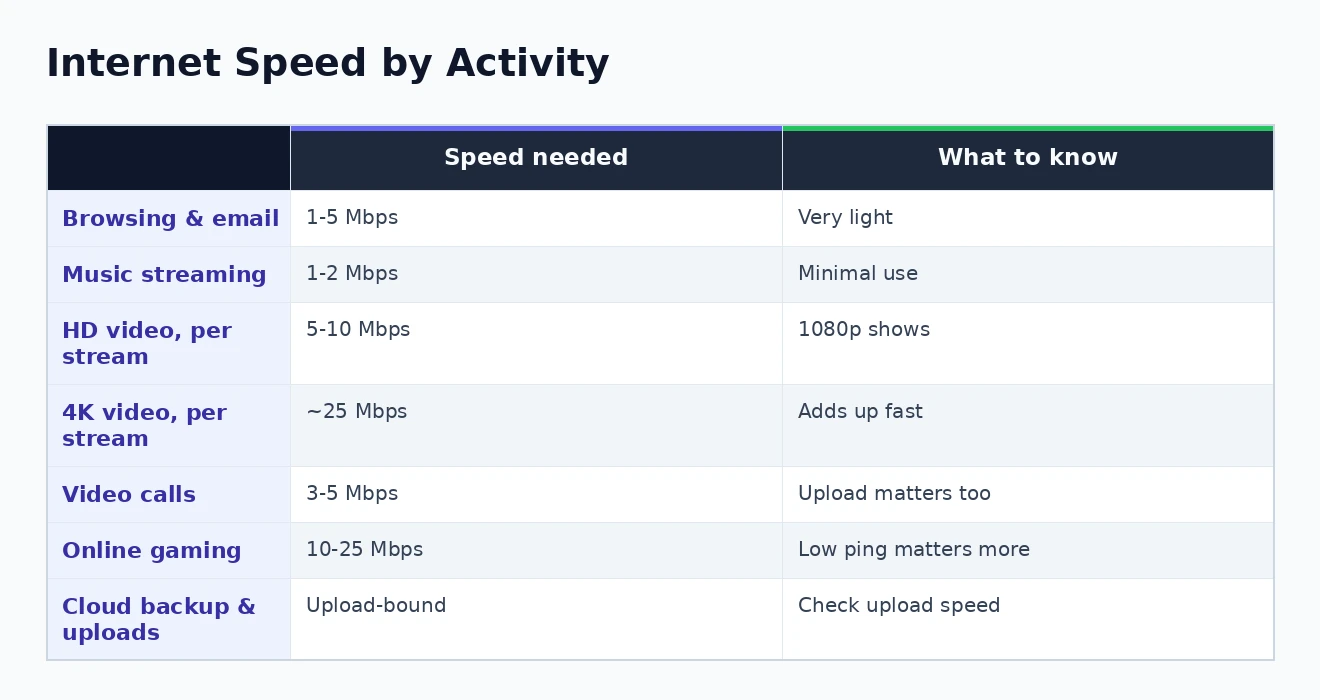
- Browsing, email, and social media: around 1 to 5 Mbps. These everyday tasks are remarkably light and barely register on a modern connection.
- Music streaming: roughly 1 to 2 Mbps. Audio uses very little, even at high quality.
- HD video streaming: about 5 to 10 Mbps per stream. Streaming a show in 1080p to one screen sits comfortably in this range.
- 4K video streaming: around 25 Mbps per stream. This is where consumption jumps sharply, and running several 4K screens at once is what drives most households’ real needs.
- Video calls: roughly 3 to 5 Mbps, and crucially this uses your upload as well as download. Group calls with many participants demand more.
- Online gaming: only about 10 to 25 Mbps for the play itself, though game downloads are large. For gaming, low latency matters far more than raw speed.
What jumps out from that list is how little most tasks need, and how 4K streaming is the outlier that dominates. A single high-definition stream, a video call, and some browsing together barely trouble a modest connection. It is only when you stack several heavy activities on top of one another that the numbers start to climb — which is the real heart of the question, and the subject of the next section. The visual below summarises these activity-by-activity figures at a glance.
Adding It Up: Speed for the Whole Household
Here is the single most important idea in this whole topic, and the one that providers conveniently gloss over: you do not need enough speed for one activity, you need enough for everything happening at the same time. Your connection is shared across every device and every person in the house simultaneously, and it is that peak of concurrent use that determines the plan you should buy.
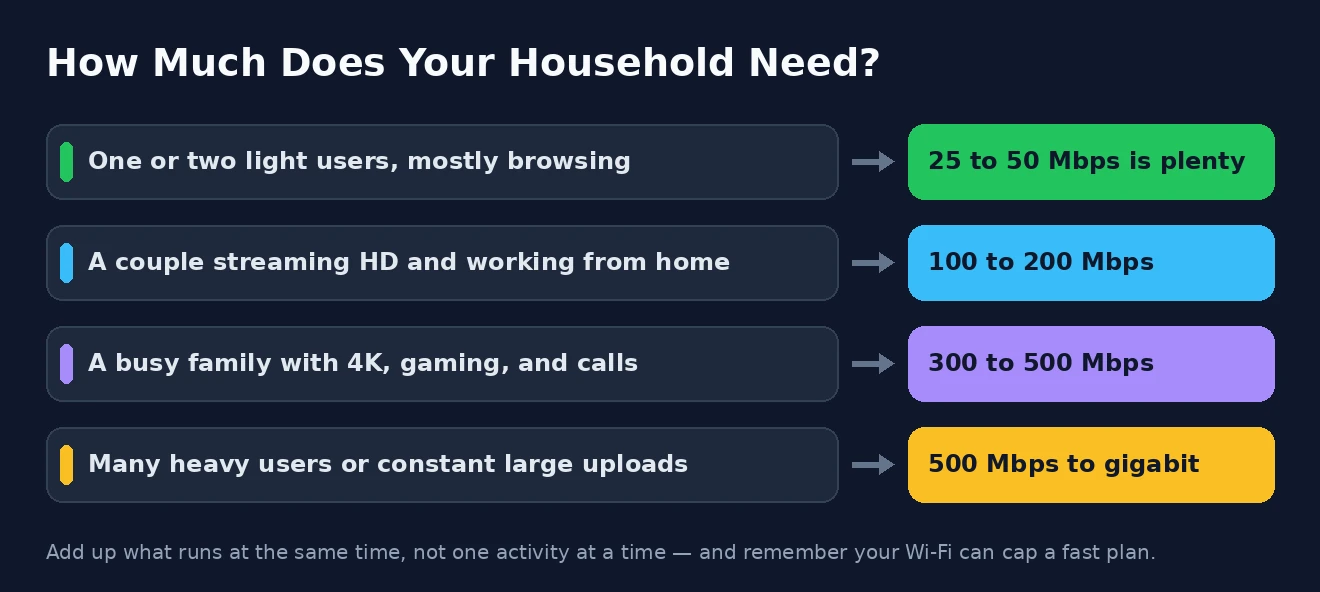
So the way to estimate your needs is to picture your busiest realistic moment and add up what is running. Imagine a weekday evening: someone watching a 4K film in the living room (25 Mbps), another person on a video call for work (5 Mbps), a teenager gaming online (20 Mbps), and a couple of phones streaming music and scrolling in the background (5 Mbps). That comes to around 55 Mbps at peak — and even then, a 100 Mbps plan would handle it with room to spare.
It is also worth remembering that every connected device draws a little even when you are not actively using it — smart speakers, thermostats, video doorbells, phones syncing in the background, and the growing crowd of other smart-home gadgets. None of these individually needs much, but a home packed with them benefits from a little extra headroom on top of your active-use total. A modern household can easily have twenty or thirty things connected at once, even when only a handful are doing anything demanding at any given moment.
This is why blanket advice to buy the fastest plan available is usually a waste of money. Count the people in your home, think about how many heavy things they genuinely do at once, add the totals together, and give yourself a comfortable cushion on top. For most households that exercise lands somewhere well short of the gigabit plans being marketed so aggressively. If your problem is that speed drops when several people are online, the fix is sometimes better management of what you have, such as prioritising bandwidth with QoS, rather than a bigger plan.
Don’t Forget Upload Speed
Almost all the attention goes to download speed, but upload speed quietly shapes a lot of modern life, and ignoring it is a common and frustrating mistake. Upload is what carries your data outward, and a plan with a fast download but a feeble upload can leave you struggling with tasks that have nothing to do with how quickly Netflix loads.
The activities that lean on upload are exactly the ones that have grown most important: video calls, where a weak upload makes you freeze and stutter for everyone else; backing up photos and files to the cloud; uploading videos; running home security cameras that stream footage offsite; and working from home in general. If your day involves any of these, the upload figure deserves as much of your attention as the headline download number.
This is where the underlying technology matters. Cable connections are typically asymmetric, offering generous download speeds but much smaller upload — you might see 300 Mbps down but only 10 or 20 up. Fibre connections are usually symmetric, giving you the same speed in both directions, which is why they are so well suited to heavy remote work. So when comparing plans, do not just glance at the big download number; check what you get for upload, especially if several people in the home work or study remotely. It also feeds into a well-planned home network more broadly.
Why You’re Probably Overpaying
Once you have added up your genuine needs, a slightly uncomfortable realisation often follows: the plan you are on is bigger than it needs to be. Providers have a strong incentive to sell you the premium tier, and “more speed” sounds like an obviously good thing, so people reach for gigabit plans that their household could not saturate if it tried.
The reason those top tiers are so hard to use is that the bottleneck is rarely the plan. A single device connected over Wi-Fi will very seldom pull more than a few hundred megabits, no matter how fast the plan behind it is, and older routers and laptops cap out lower still. Spending on a gigabit connection while your equipment and your Wi-Fi can only deliver a fraction of it is money poured into a number you will never actually see. Diminishing returns set in well before the fastest tier.
A plan is only as fast as the weakest link between the internet and your device. If your Wi-Fi, your router, or your laptop cannot keep up, paying for more speed at the wall changes nothing you can feel.
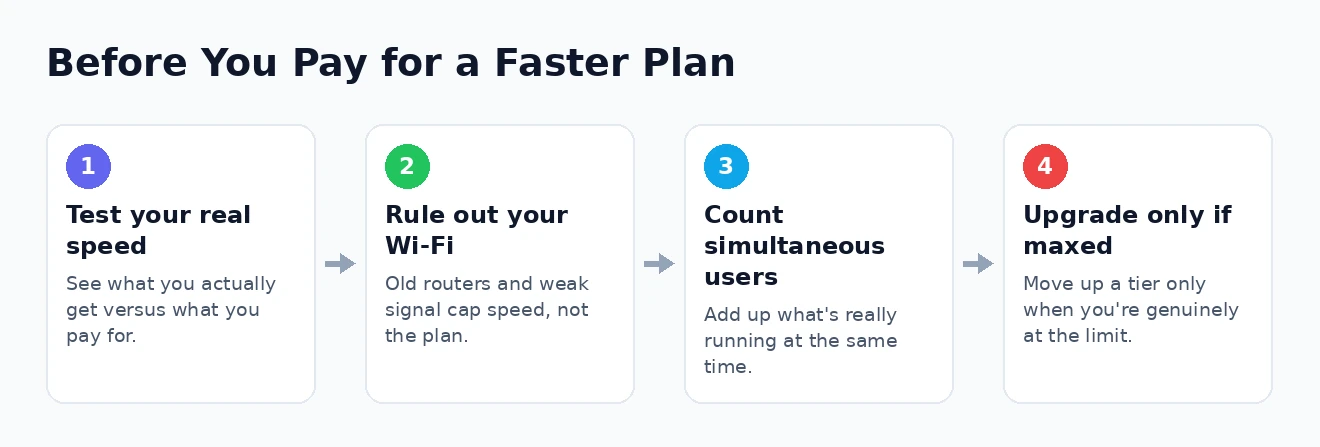
This matters because slow internet is so often blamed on the plan when the real culprit lies inside the home. Constant buffering frequently comes down to Wi-Fi coverage, an ageing router, or too many devices on an old network — problems a faster plan will not touch. Before upgrading, it is worth ruling those out by improving your Wi-Fi speed and, if a single router cannot cover your home, considering a mesh Wi-Fi network. Fixing the setup you have is usually cheaper than a permanently larger bill. The Consumer Reports website has resources you may find useful on choosing and comparing internet plans.
Speed Isn’t the Whole Story
Focusing purely on megabits misses a few things that matter just as much to how the internet actually feels, and understanding them helps you avoid buying speed to solve a problem speed cannot fix. The most important of these is latency, the delay before data starts moving, usually measured in milliseconds.
For a great many activities, latency matters more than raw speed. Online gaming, video calls, and video conferencing all depend on low, steady latency far more than on a huge download figure — a gamer on a modest connection with excellent latency will have a smoother time than one on a gigabit plan with a laggy, congested link. Consistency matters too: a connection that reliably delivers its speed all day is better than one that peaks high but sags every evening when the neighbourhood logs on.
It is also worth keeping data caps in mind, since some plans limit how much you can use in a month regardless of speed, and heavy 4K streaming can eat through an allowance quickly. When a fast connection still feels slow, the answer is usually inside your network rather than in a bigger plan, and our guide to fixing a slow home network walks through the usual suspects. Government resources can help you make sense of the benchmarks, and the FCC website has resources you may find useful on broadband speeds and what counts as adequate.
How Much Internet Speed Do You Need? Common Questions
How many Mbps do I need to stream Netflix?
For high-definition streaming, around 5 to 10 Mbps per screen is comfortable, while 4K needs roughly 25 Mbps per stream. The figure that matters is how many screens run at once: one 4K stream is easy on almost any plan, but three or four at the same time is what pushes your requirement up.
Is 100 Mbps enough, or is gigabit worth it?
For most households, 100 to 300 Mbps is plenty, comfortably handling several streams, calls, and games at once. Gigabit plans are genuinely useful only for very large households with many simultaneous heavy users, or for those who routinely move enormous files — for everyone else, the speed simply cannot be used and the money is better saved.
How much internet speed do I need to work from home?
A single remote worker on video calls is fine with a modest connection of around 25 to 50 Mbps, but pay close attention to upload speed, which video calls and cloud backups rely on. If several people work or study from home at once, aim higher and strongly favour a plan with a healthy upload figure, ideally a symmetric fibre connection.
Will a faster plan make my Wi-Fi faster?
Not necessarily. If your Wi-Fi coverage is weak or your router is old, a faster plan will not fix it, because the bottleneck is inside your home rather than at the connection. It is usually better to improve your Wi-Fi or upgrade your router first, and only then consider a faster plan if you are genuinely maxing out what you have.
So, how much internet speed do you need? Almost certainly less than you are being sold. Add up what your household really does at the same time, give yourself a sensible cushion, pay attention to upload as well as download, and remember that your own Wi-Fi and equipment often matter more than the number on the plan. Get those things right, and you can pick a connection that feels fast, does everything you need, and stops you paying for megabits you will never touch.